---
title: "Linear Regression in R"
description: "Practical implementation of simple and multiple linear regression in R: fitting models with lm(), interpreting coefficients, computing R², understanding omitted variable bias, applying log and quadratic transformations, and reading diagnostic plots."
author: "Claudius Gräbner-Radkowitsch"
date: 2026-06-16
date-modified: 2026-06-16
image: ../assets/images/r-programming.png
learning-objectives:
- "Fit simple and multiple linear regression models using `lm()` and interpret the coefficients"
- "Calculate and interpret R² manually and with R's built-in functions"
- "Explain omitted variable bias and demonstrate it with an example"
- "Apply log and quadratic transformations to linearize non-linear relationships"
categories:
- R
- regression
- statistics
- tutorial
- BA
level:
- BA
content-type: tutorial
citation:
id: graebner2026-linear-regression-r
type: entry-encyclopedia
container-title: "Method and Inquiry"
title: "Linear Regression in R"
editor:
- name: "Claudius Gräbner-Radkowitsch"
url: https://euf-methodology-hub.netlify.app/resources/linear-regression-r
---
```{=html}
<div class="track-nav">
<span class="track-nav-label">Introduction to Regression in R</span>
<span class="track-nav-position">Step 2 of 4</span>
<span class="track-nav-links">← <a href="logarithms-introduction.qmd">Logarithms: A Gentle Introduction</a>  ·  <a href="regression-residuals-diagnostics.qmd">Regression Diagnostics</a> →</span>
<a href="../tracks/introduction-to-regression-in-r.qmd" class="track-nav-full">View full track →</a>
</div>
```
# Introduction
In this tutorial, we will focus on the practical aspects of implementing linear regression models in R.
The tutorial extends simple linear regression to multiple regression.
We'll also explore how to handle non-linear relationships through data transformation practically and discuss the important concept of omitted variable bias.
## Prerequisites
- Basic understanding of linear regression concepts
- Familiarity with R and RStudio, as developed in previous tutorials
- Understanding of basic statistical concepts (mean, variance, correlation)
# Setup and Data
## Loading Required Packages
In this tutorial we will use the following libraries:
```{r}
#| label: setup
# Load required packages explicitly
library(ggplot2)     # For data visualization
library(dplyr)       # For data manipulation
library(readr)       # For reading CSV files
library(moderndive)  # For regression tables
library(broom)       # For model summaries
library(here)        # For file paths
library(kableExtra)  # For nice HTML tables, optional for you
```
## Loading the Datasets
For this tutorial, we'll work with the following business data sets that demonstrate different aspects of regression analysis.
```{r}
#| label: load-data
# Load the three datasets
marketing_data <- read_csv("data/marketing_roi.csv")
pricing_data <- read_csv("data/pricing_strategy.csv")
hr_data <- read_csv("data/hr_salaries.csv")
firm_growth_data <- read_csv("data/firm_growth.csv")
marketing_efficiency_data <- read_csv("data/marketing_efficiency.csv")
```
# Simple Linear Regression
Let's start with the fundamentals of simple linear regression using the marketing dataset.
It is always a good idea to first inspect the data set you are using:
```{r}
glimpse(marketing_data)
```
### Basic Implementation
To fit a linear regression model we use the function `lm()` (which stands for "linear model").
Here we conduct a regression with sales revenue as the dependent, and ad spending as the independent variable:
$$SALES = \beta_0 + \beta_1 EXP_{Ads} + \epsilon $$
To this end we specify the LHS and RHS of the regression equation, separated by a `~`, through the argument `formula`.
The variable names must be the same as in the data set we use, and which we specify through the argument `data`:
```{r}
#| label: simple-regression
# Simple regression: Sales Revenue ~ Ad Spend
model_simple <- lm(formula = sales_revenue ~ ad_spend, data = marketing_data)
model_simple
```
You can get additional information by using the function `summary()` on the
resulting object, or the function `get_regression_table` from the package `moderndive`:
```{r}
# Display results using moderndive for clean output
get_regression_table(model_simple) %>%
  kable(caption = "Simple Linear Regression: Sales Revenue ~ Ad Spend") %>%
  kable_styling(bootstrap_options = c("striped", "hover", "condensed"))
```
### Interpreting the basic regression model
We estimated two main parameters of interest, the intercept $\beta_0$ and the slope $\beta_1$:
```{r}
#| label: simple-interpretation
# Extract key values for interpretation
intercept <- round(coef(model_simple)[1], 0)
slope <- round(coef(model_simple)[2], 3)
```
In our fitted model we have:
- $\hat{\beta_0}=$ `r intercept`
- $\hat{\beta_1}=$ `r slope`
The means that:
- **Base Revenue**: Even without advertising, we can expect a baseline revenue of `r format(intercept, big.mark = ",")` EUR (although intercepts must be interpreted with great care)
- **Return on Investment**: Every EUR spent on advertising is associated with on average approximately `r round(slope, 2)` EUR in additional sales revenue
### Visualizing the Regression
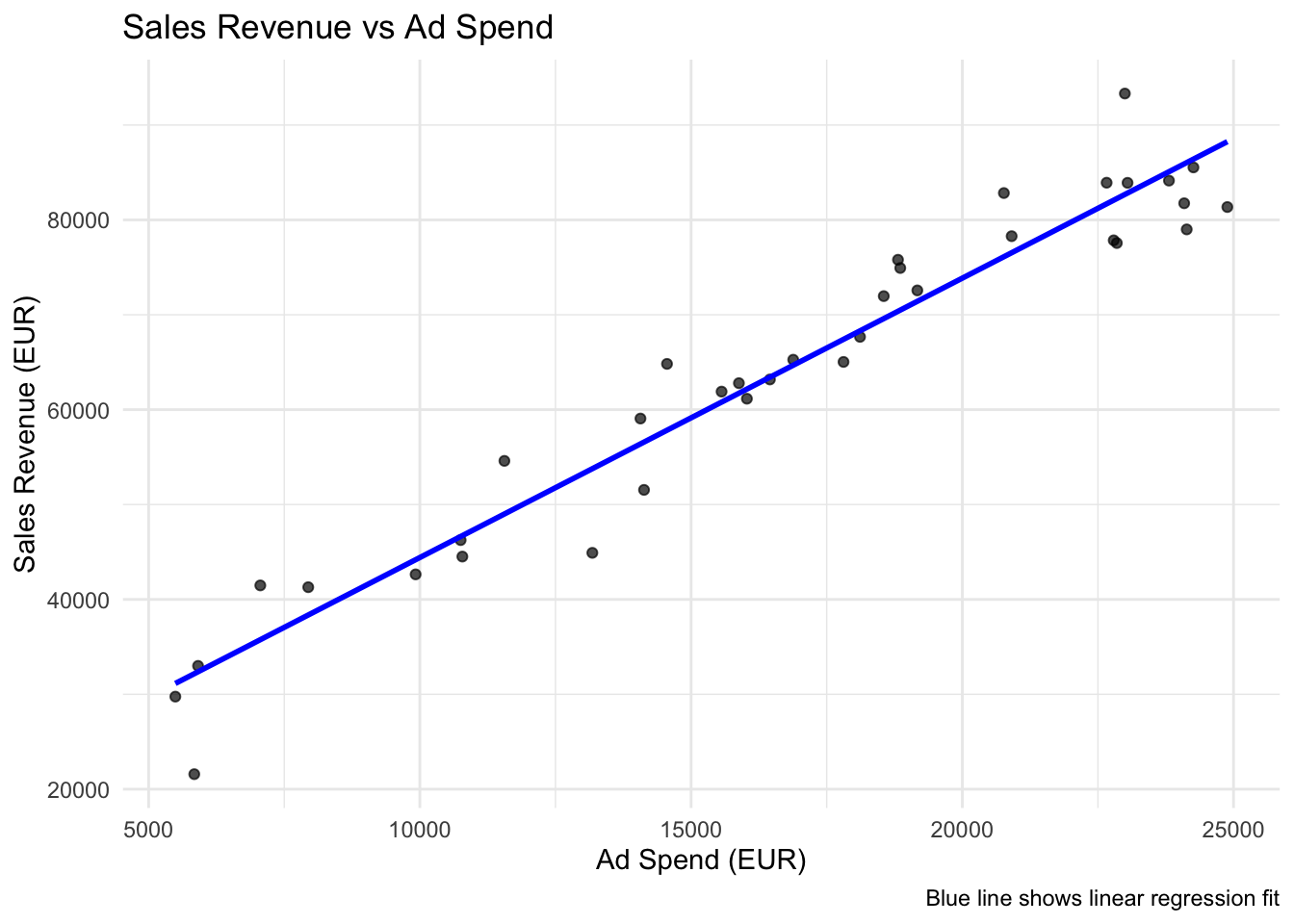
One of the most useful features of `ggplot2` is the `geom_smooth()` function, which can automatically fit and display regression lines:
```{r}
#| label: simple-viz
# Create scatter plot with regression line
ggplot(marketing_data, aes(x = ad_spend, y = sales_revenue)) +
  geom_point(alpha = 0.7) +
  geom_smooth(method = "lm", se = FALSE, color = "blue", linewidth = 1) +
  labs(
    title = "Sales Revenue vs Ad Spend",
    x = "Ad Spend (EUR)",
    y = "Sales Revenue (EUR)",
    caption = "Blue line shows linear regression fit"
  ) +
  theme_minimal()
```
::: {.callout-tip}
## Understanding geom_smooth()
- `method = "lm"` fits a linear model
- `se = FALSE` removes the confidence interval bands
- `se = TRUE` (default) shows 95% confidence intervals
- You can also use `method = "loess"` for flexible, non-parametric fits
:::
# Multiple Linear Regression
Real-world relationships often involve multiple variables. Let's extend our model to include website traffic.
### Adding a Second Predictor
Conceptually, we are now estimating the following model:
$$SALES = \beta_0 + \beta_1 EXP_{Ads} + \beta_2 TRAFFIC + \epsilon $$
To do this in `R`, we proceed exactly as before and just add the new independent variable to the `formula`:
```{r}
#| label: multiple-regression
# Multiple regression: Sales ~ Ad Spend + Website Traffic
model_multiple <- lm(sales_revenue ~ ad_spend + website_traffic,
                    data = marketing_data)

get_regression_table(model_multiple) %>%
  kable(caption = "Multiple Linear Regression: Sales Revenue ~ Ad Spend + Website Traffic") %>%
  kable_styling(bootstrap_options = c("striped", "hover", "condensed"))
```
## Interpreting Both Predictors
We now estimated *three* main parameters of interest, the intercept $\beta_0$ and two slope parameters $\beta_1$, and $\beta_2$:
```{r}
#| label: multiple-interpretation
# Extract coefficients for interpretation
intercept_mult <- round(coef(model_multiple)[1], 0)
ad_coef_mult <- round(coef(model_multiple)[2], 3)
traffic_coef <- round(coef(model_multiple)[3], 3)
```
In our fitted model we have:
- $\hat{\beta_0}=$ `r intercept_mult`
- $\hat{\beta_1}=$ `r ad_coef_mult`
- $\hat{\beta_2}=$ `r traffic_coef`
In the multiple regression framework the interpretation of the coefficients changes slightly, as we now estimate *ceteris paribus* effects, sometimes also called *direct effects*, in contrast to the *total association* that was our focus in the simple regression framework.
More precisely, the estimates in the multiple regression framework control for changes in the other variables.
The means that these are the changes we can expect in the dependent variable, if the independent variable changed by one unit, and all other variables stayed the same.
More precisely:
- $\hat{\beta_1}=$ `r ad_coef_mult` means that for every increase of 1 EUR in ad spending, there is an associated increase of revenue of, on
average and ceteris paribus, `r ad_coef_mult` EUR.
- $\hat{\beta_2}=$ `r traffic_coef` means that every increase of website traffic by 1 person is associated with an increase of revenue of, on
average and ceteris paribus, `r traffic_coef` EUR.
Note that the *indirect effect* of ad spending is different to the direct effect estimated!
More precisely, the direct effect of advertising (`r ad_coef_mult` EUR) is smaller than the total effect (`r slope` EUR) because some of advertising's impact works through increased website traffic, and the multiple regression framework helps us to identify these different channels.
We also say that the simple regression model was *confounding* the effects of ad spend and website traffic!
## Omitted Variable Bias
This brings us to one of the most important concepts in regression analysis:
*omitted variable bias*.
It occurs when both of the following conditions are met:
- There is a variable that correlates with our dependent variable **and**...
- also correlates with one of our independent variables.
### The Theory
When we omit a relevant variable from our regression, the coefficients of included variables become **biased**. The bias depends on:
1. How strongly the omitted variable affects the outcome
2. How correlated the omitted variable is with included variables
### Example 1: Marketing Data - Coefficient Size Change
In our previous example, $\hat{\beta}_1$ for the simple model was
`r round(coef(model_simple)["ad_spend"], 2)`
and for the multiple model it was
`r round(coef(model_multiple)["ad_spend"], 2)`,
meaning that we have a total bias of
`r round(coef(model_simple)["ad_spend"] - coef(model_multiple)["ad_spend"], 2)`.
Since website traffic is positively correlated with ad spend AND positively affects sales, the simple model **overestimates** the effect of ad spend.
### Example 2: When Coefficients Change Sign Completely
Sometimes omitted variable bias is so severe that it completely changes the **direction** of the relationship. Let's look at an example using beer consumption data:
```{r}
#| label: beer-example
beer_data <- DataScienceExercises::beer %>%
  dplyr::mutate(income = income/1000)

model_1 <- lm(
  formula = consumption ~ income,
  data=beer_data)
model_2 <- lm(
  formula = consumption ~ income + price,
  data=beer_data)
model_3 <- lm(
  formula = consumption ~ income + price + price_liquor,
  data=beer_data)
model_4 <- lm(
  formula = consumption ~ income + price  + price_liquor + price_other,
  data=beer_data)
```
```{r}
modelsummary::modelsummary(
  models = list(
    "Simple"=model_1,
    "Model 2"=model_2,
    "Model 3"=model_3,
    "Model 4"=model_4),
  gof_map = c("nobs", "r.squared"),
  stars = TRUE)
```
This example shows how omitted variable bias can lead to completely **wrong business conclusions**:
- **Wrong conclusion** (simple model): "Higher-income customers drink less beer - target low-income segments"
- **Correct conclusion** (multiple model): "Higher-income customers drink more beer, but they're price-sensitive - consider premium pricing strategies"
The simple regression result could lead to disastrous policy decisions!
# Model Diagnostics
Good regression analysis doesn't stop at fitting the model. We need to check our assumptions and test how good the model explains the dependent variable.
## The explanatory power: $R^2$
$R^2$ measures the proportion of variation in the dependent variable explained by our model.
It is defined as the ratio between the total variation ('Total Sum of Squares') and
the explained variation. Since the residuals are our measure for *unexplained* variation,
we can compute $R^2$ by the following formula:
$$R^2 = 1- \frac{RSS}{TSS}$$
Let's calculate it manually to understand what it means.
```{r}
#| label: r-squared-manual
# Get the actual and fitted values
y_actual <- marketing_data$sales_revenue
y_fitted <- predict(model_simple)
y_mean <- mean(y_actual)

# Calculate the components
TSS <- sum((y_actual - y_mean)^2)      # Total Sum of Squares
RSS <- sum((y_actual - y_fitted)^2)    # Residual Sum of Squares

# Calculate R²
r_squared_manual <- 1 - (RSS / TSS)

cat("Manual R² calculation:", round(r_squared_manual, 4), "\n")
cat("R's built-in R²:", round(summary(model_simple)$r.squared, 4), "\n")
```
But in practice there is no need to compute it manually, as it is stored in the
`summary` of every regression object:
```{r}
#| label: r-squared-comparison
# Compare R² between models
r2_simple <- summary(model_simple)$r.squared
r2_multiple <- summary(model_multiple)$r.squared

cat("Simple model R²:", round(r2_simple, 4), "\n")
cat("Multiple model R²:", round(r2_multiple, 4), "\n")
cat("Improvement:", round(r2_multiple - r2_simple, 4), "\n")
```
In our case:
- The $R^2$ of the simple model is `r round(r2_simple, 4)`. This means that this model explains `r round(r2_simple, 2)` % of the variation in the dependent variable.
- The $R^2$ of the multiple model is `r round(r2_multiple, 4)`. This means that this model explains `r round(r2_multiple, 2)` % of the variation in the dependent variable.
But be careful: a higher $R^2$ does not necessarily imply better prediction or inference capability of the model!
## Key Diagnostic Plots
The most important assumptions of linear regression are about the nature of the error term $\epsilon$.
But as discussed previously, the error term is located on the population level,
meaning it will always remain unobservable. Therefore, we usually inspect its sample equivalent, the residuals, to test the most important assumptions.
The two most important assumptions are:
1. The error term is uncorrelated with the dependent variable.
2. The error follows a normal distribution with mean zero.
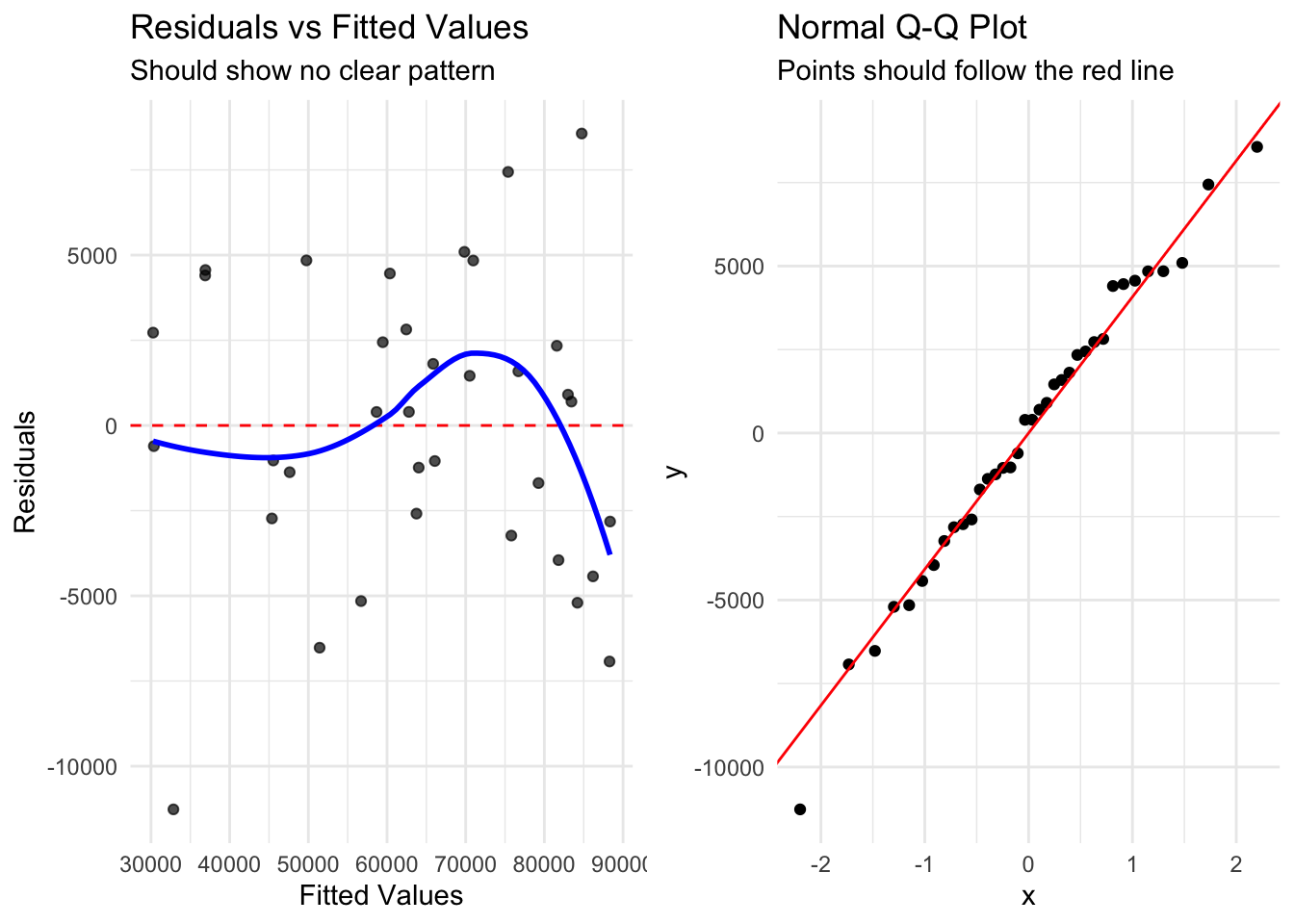
To test assumption 1, we can look at the correlation between residuals and fitted values.
If our model is good, we should see no structure.
To test assumption 2, we can look at a so called QQ-plot.
QQ stands for quantile-quantile. Such a plot plots the quantiles of the data
(here: residuals) against the theoretical quantiles if the data was following a normal distribution.
If the residuals are normally distributed, they should follow a straight line.
```{r}
#| label: diagnostics
# Create augmented data with fitted values and residuals
marketing_augmented <- augment(model_multiple)

# Tukey-Anscombe Plot (Residuals vs Fitted)
p1 <- ggplot(marketing_augmented, aes(x = .fitted, y = .resid)) +
  geom_point(alpha = 0.7) +
  geom_hline(yintercept = 0, linetype = "dashed", color = "red") +
  geom_smooth(se = FALSE, color = "blue") +
  labs(
    title = "Residuals vs Fitted Values",
    x = "Fitted Values",
    y = "Residuals",
    subtitle = "Should show no clear pattern"
  ) +
  theme_minimal()

# Normal Q-Q Plot
p2 <- ggplot(marketing_augmented, aes(sample = .resid)) +
  stat_qq() +
  stat_qq_line(color = "red") +
  labs(
    title = "Normal Q-Q Plot",
    subtitle = "Points should follow the red line"
  ) +
  theme_minimal()

gridExtra::grid.arrange(p1, p2, ncol = 2)
```
In this example we see that both assumptions seem to be satisfied, although some
small structure in the residuals persist.
# Data Transformation for Non-linear Relationships
Not all relationships are linear!
But remember that for linear regression, we only need to assume
*linearity in parameters*!
This means that sometimes we can transform our data to make initially non-linear relationships linear and still use linear regression effectively.
## When to Transform Data
Common scenarios requiring transformation:
- **Exponential relationships**: Often seen with salary/experience, population growth
- **U-shaped relationships**: Common in economics (e.g., effort vs performance)
- **Diminishing returns**: Sales response to advertising often follows this pattern
In practice, always visualize your data first and experiment with various transformation strategies - this is the best way to determine whether data transformation can help you.
Also, the diagnostic plots discussed above can also provide hints on necessary transformations:
if the Tukey-Anscombe plot shows structure, think about transforming the data!
## Log Transformation Example
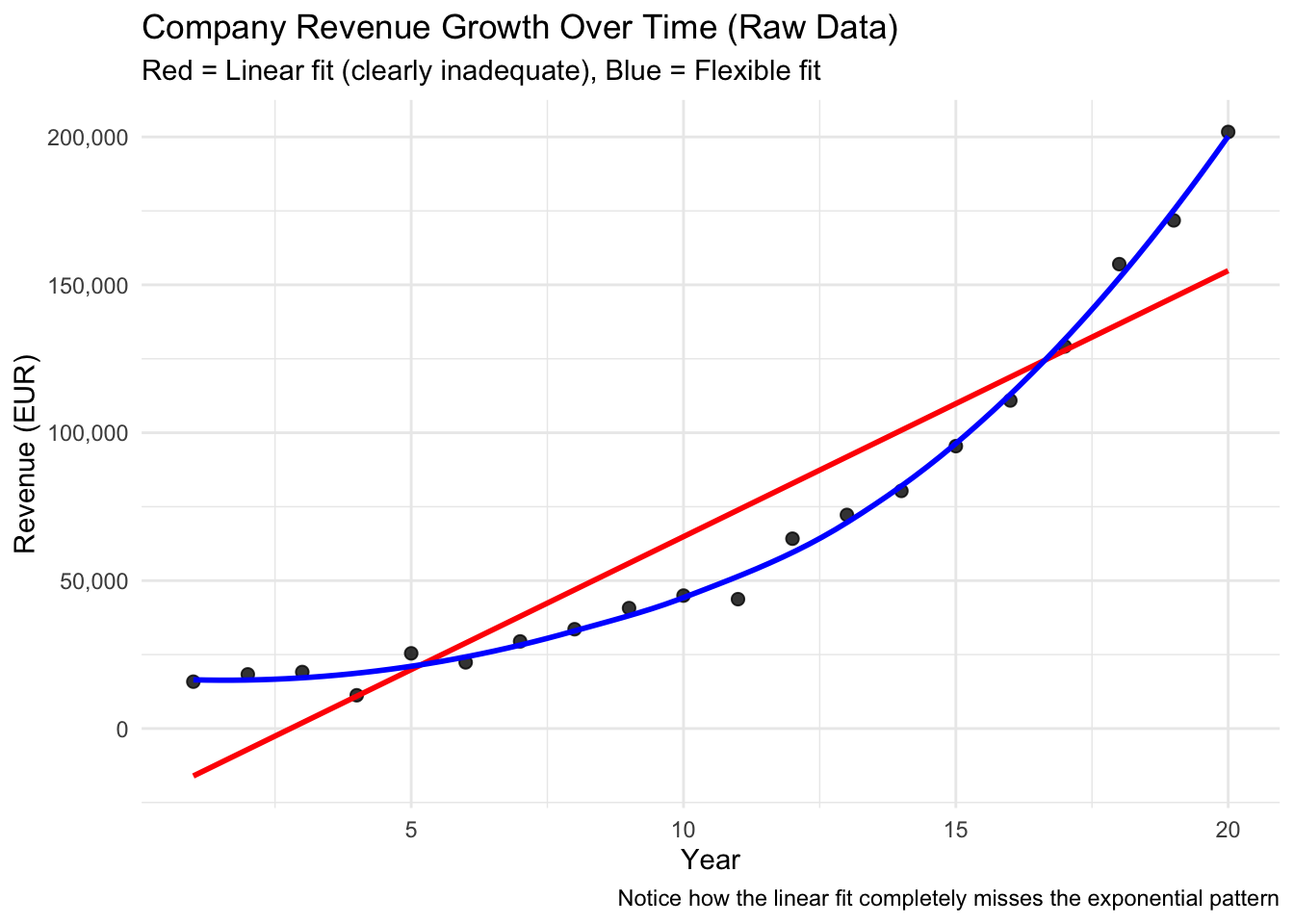
Let's examine a **company's revenue growth over time** - a classic example of exponential growth that appears linear after log transformation:
```{r}
#| label: log-transformation-setup
# First, visualize the raw exponential relationship
ggplot(firm_growth_data, aes(x = year, y = revenue)) +
  geom_point(size = 2, alpha = 0.8) +
  geom_smooth(method = "lm", se = FALSE, color = "red", linewidth = 1) +
  geom_smooth(method = "loess", se = FALSE, color = "blue", linewidth = 1) +
  labs(
    title = "Company Revenue Growth Over Time (Raw Data)",
    subtitle = "Red = Linear fit (clearly inadequate), Blue = Flexible fit",
    x = "Year",
    y = "Revenue (EUR)",
    caption = "Notice how the linear fit completely misses the exponential pattern"
  ) +
  scale_y_continuous(labels = scales::comma) +
  theme_minimal()
```
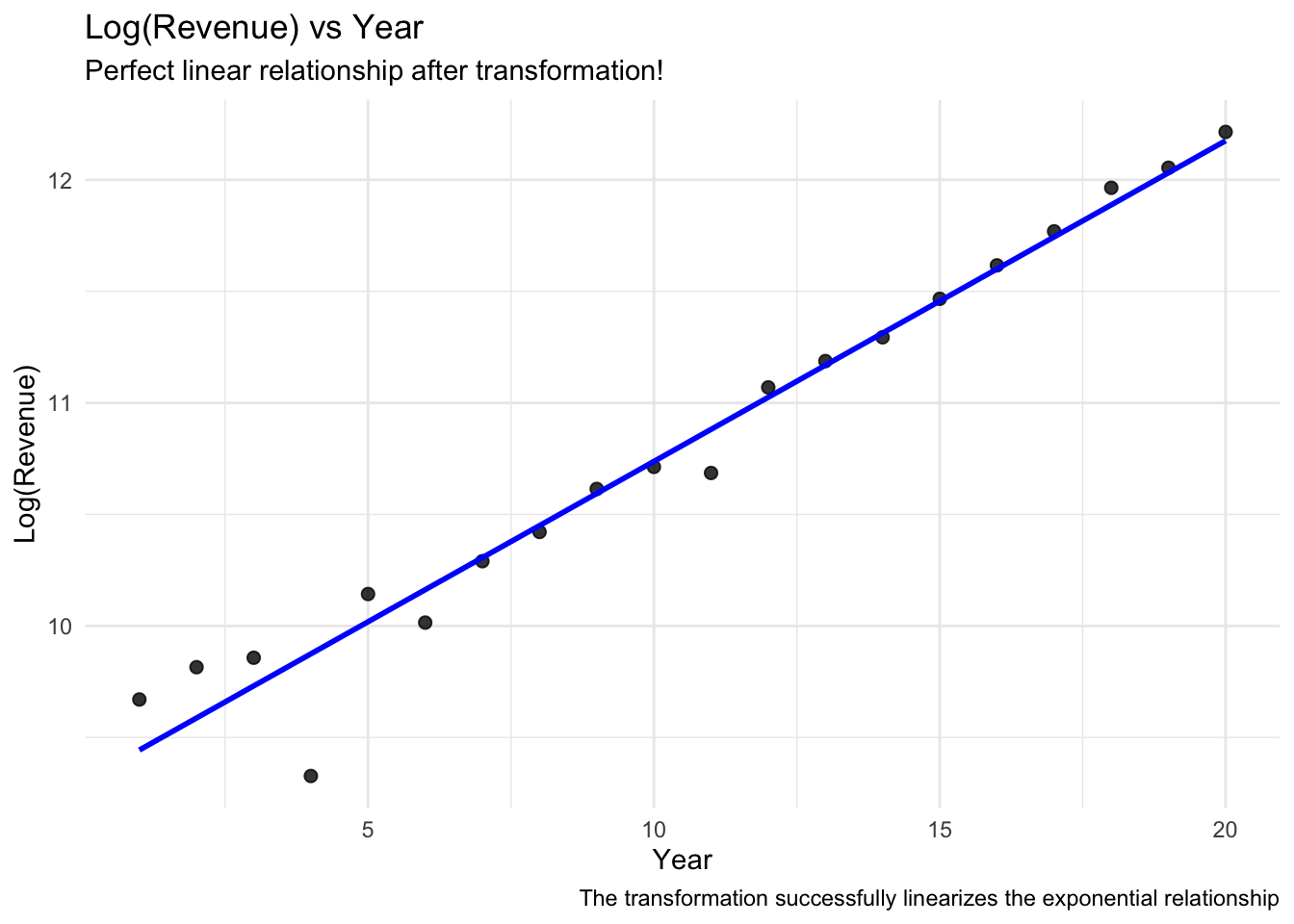
The exponential pattern is very clear! The red linear line completely fails to capture the relationship. Let's try a log transformation:
```{r}
#| label: log-transformation
# Create log-transformed variable
firm_growth_data_log <- firm_growth_data %>%
  mutate(log_revenue = log(revenue))

# Fit both models
model_linear_exp <- lm(revenue ~ year, data = firm_growth_data)
model_log_exp <- lm(log_revenue ~ year, data = firm_growth_data_log)

# Visualize the log-transformed relationship
ggplot(firm_growth_data_log, aes(x = year, y = log_revenue)) +
  geom_point(size = 2, alpha = 0.8) +
  geom_smooth(method = "lm", se = FALSE, color = "blue", linewidth = 1) +
  labs(
    title = "Log(Revenue) vs Year",
    subtitle = "Perfect linear relationship after transformation!",
    x = "Year",
    y = "Log(Revenue)",
    caption = "The transformation successfully linearizes the exponential relationship"
  ) +
  theme_minimal()
```
```{r}
modelsummary::modelsummary(
  models = list("Lin-Lin"=model_linear_exp, "Log-lin"=model_log_exp),
  gof_map = c("nobs", "r.squared"),
  stars = TRUE, output = "kableExtra")
```
### Interpreting Log Models
When you transform data, you need to interpret your results accordingly.
For instance, when the dependent variable is log-transformed, coefficients represent **percentage changes**:
> Every year is, on average, associated with a
`r round( coef(model_log_exp)["year"] * 100, 1)`
% increase in revenue.
::: {.callout-important}
### Why Log Transformation Works for Exponential Data
Exponential relationships have the form: $Y = A \cdot e^{Bx}$
Taking the natural log: $\ln(Y) = \ln(A) + Bx$
This transforms the exponential curve into a straight line where:
- The slope B represents the **growth rate**
- $e^B - 1$ gives the percentage change per unit increase in x
:::
## Quadratic Relationships
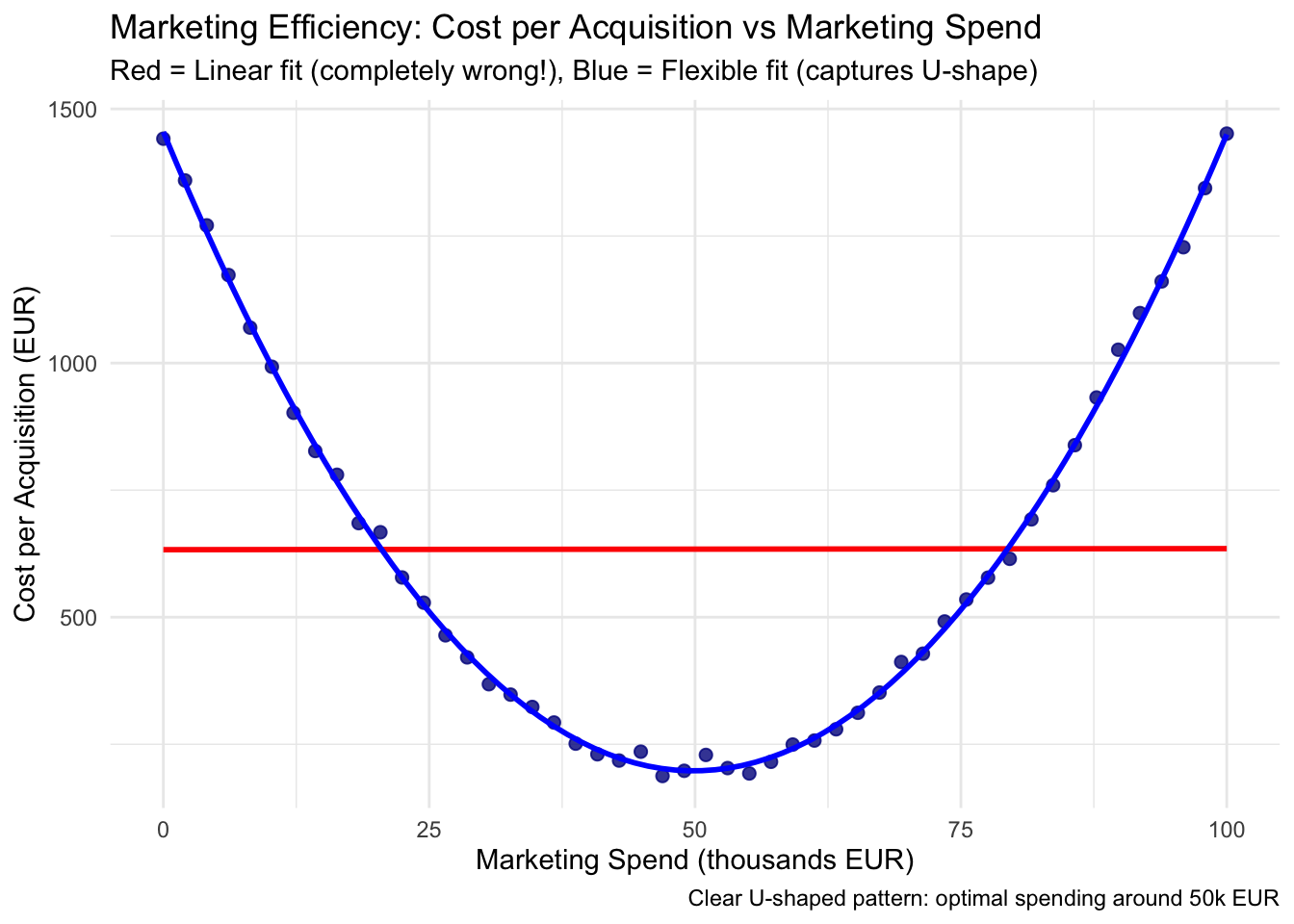
Sometimes relationships are U-shaped or inverted-U shaped. A perfect example is **marketing efficiency**: too little spending is inefficient (high fixed costs), and too much spending leads to diminishing returns:
```{r}
#| label: exercise-2
# First, visualize the clear U-shaped relationship
ggplot(marketing_efficiency_data, aes(x = marketing_spend, y = cost_per_acquisition)) +
  geom_point(size = 2, alpha = 0.8, color = "darkblue") +
  geom_smooth(method = "lm", se = FALSE, color = "red", linewidth = 1) +
  geom_smooth(method = "loess", se = FALSE, color = "blue", linewidth = 1) +
  labs(
    title = "Marketing Efficiency: Cost per Acquisition vs Marketing Spend",
    subtitle = "Red = Linear fit (completely wrong!), Blue = Flexible fit (captures U-shape)",
    x = "Marketing Spend (thousands EUR)",
    y = "Cost per Acquisition (EUR)",
    caption = "Clear U-shaped pattern: optimal spending around 50k EUR"
  ) +
  theme_minimal()
```
The U-shaped pattern is unmistakable! Now let's compare linear vs quadratic models:
```{r}
#| label: quadratic-models
# Create squared term for quadratic model
marketing_efficiency_data <- marketing_efficiency_data %>%
  mutate(marketing_spend_squared = marketing_spend^2)

# Fit both models
marketing_linear <- lm(cost_per_acquisition ~ marketing_spend, data = marketing_efficiency_data)
marketing_quadratic <- lm(cost_per_acquisition ~ marketing_spend + marketing_spend_squared,
                         data = marketing_efficiency_data)

# Compare R²
r2_linear_quad <- summary(marketing_linear)$r.squared
r2_quadratic <- summary(marketing_quadratic)$r.squared

cat("Linear model R²:", round(r2_linear_quad, 3))
cat("\nQuadratic model R²:", round(r2_quadratic, 3))
cat("\nImprovement:", round(r2_quadratic - r2_linear_quad, 3))
```
With quadratic terms, interpretation becomes more nuanced because the effect of the variable **changes** depending on its current level:
```{r}
#| label: quadratic-interpretation
# Extract coefficients for interpretation
linear_coef <- coef(marketing_quadratic)["marketing_spend"]
quadratic_coef <- coef(marketing_quadratic)["marketing_spend_squared"]

# Find the optimal point (minimum of the parabola)
optimal_spend <- -linear_coef / (2 * quadratic_coef)
cat("Optimal marketing spend:", round(optimal_spend, 1), "thousand EUR\n")
```
::: {.callout-tip}
Understanding Quadratic Models
**The quadratic model equation**: Cost = β₀ + β₁×Spend + β₂×Spend²
**Key insights:**
1. **Linear term** (β₁ = `r round(linear_coef, 3)`): The initial direction of the relationship
2. **Quadratic term** (β₂ = `r round(quadratic_coef, 4)`): How the slope changes
- Positive β₂ → U-shaped (costs increase at extremes)
- Negative β₂ → Inverted-U (optimal point in middle)
3. **Optimal point**: Where marginal effect = 0
:::
# Key Takeaways
## Main Learning Points
1. **Multiple regression** controls for confounding variables and reduces omitted variable bias
2. **$R^2$** measures explained variance but isn't the only criterion for model quality
3. **Data transformation** can help linearize non-linear relationships
4. **geom_smooth(method = "lm")** provides easy and effective visualization of regression fits
5. **Residual analysis** is crucial for checking model assumptions
6. **Business context** should always guide model interpretation
7. **Omitted variable bias** can completely reverse coefficient signs and lead to wrong business decisions
8. **Quadratic models** capture non-linear relationships and reveal optimal points
## Common Pitfalls to Avoid
- Don't interpret correlation as causation
- Don't ignore potential confounding variables
- Don't rely solely on $R^2$ for model selection
- Don't forget to check model assumptions through residual analysis
- Don't use linear models for clearly non-linear relationships without considering transformations
- Don't make business decisions based on biased models
## Practice
The `LinearRegression1` and `LinearRegression2` exercise sets in the `DataScienceExercises` package
cover the main concepts from this tutorial:
```{r, eval=FALSE}
learnr::run_tutorial(
  name = "LinearRegression1",
  package = "DataScienceExercises",
  shiny_args = list("launch.browser" = TRUE)
)
```
```{r, eval=FALSE}
learnr::run_tutorial(
  name = "LinearRegression2",
  package = "DataScienceExercises",
  shiny_args = list("launch.browser" = TRUE)
)
```
See the [blog post on DataScienceExercises](../blog/2026-06-16-datascienceexercises/index.qmd)
for installation instructions.
## Further reading
- [Chapter 5](https://moderndive.com/v2/regression.html) and [Chapter 6](https://moderndive.com/v2/multiple-regression.html) in ModernDive
<script src="https://giscus.app/client.js"
data-repo="graebnerc/research-methodology-hub"
data-repo-id="R_kgDOS7J-4w"
data-category="Comments"
data-category-id="DIC_kwDOS7J-484C_N51"
data-mapping="pathname"
data-strict="0"
data-reactions-enabled="1"
data-emit-metadata="0"
data-input-position="bottom"
data-theme="preferred_color_scheme"
data-lang="en"
crossorigin="anonymous"
async>
</script>