---
title: "Experiments in R"
description: "How to analyze experimental data in R: t-tests for simple comparisons, one-way and two-way ANOVA for multi-group designs, effect sizes, post-hoc tests, and power analysis."
author: "Claudius Gräbner-Radkowitsch"
date: 2026-06-16
date-modified: 2026-06-16
image: ../assets/images/r-programming.png
learning-objectives:
- "Conduct independent and paired t-tests and calculate Cohen's d effect size"
- "Run one-way and two-way ANOVA using both `aov()` and `lm()` and explain why they give identical results"
- "Perform post-hoc comparisons with Tukey's HSD to identify which groups differ"
- "Conduct a priori and post-hoc power analysis using the pwr package"
categories:
- R
- experiments
- statistics
- tutorial
- BA
level:
- BA
content-type: tutorial
citation:
id: graebner2026-experiments-in-r
type: entry-encyclopedia
container-title: "Method and Inquiry"
title: "Experiments in R"
editor:
- name: "Claudius Gräbner-Radkowitsch"
url: https://euf-methodology-hub.netlify.app/resources/experiments-in-r
---
# Video lecture {.unnumbered}
```{=html}
<div class="embed-container">
<iframe width="560" height="315" src="https://www.youtube-nocookie.com/embed/videoseries?si=UBJo1AiCblQZFtZD&list=PLZDawQMrG1RImURlbldAF773MDRqeARNu" title="YouTube video player" frameborder="0" allow="accelerometer; autoplay; clipboard-write; encrypted-media; gyroscope; picture-in-picture; web-share" referrerpolicy="strict-origin-when-cross-origin" allowfullscreen></iframe>
</div>
```
# Introduction
In this tutorial we will learn how to analyze data obtained from experiments. We will
complement the theoretical treatment by also introducing some additional, practically relevant
concepts.
More precisely, we focus on the following aspects:
- Import and explore datasets as typically produced by experiments
- Conduct t-tests for simple experimental comparisons
- Perform ANOVA for multi-group comparisons
- Understand how ANOVA is a special case of linear regression
- Analyze factorial experimental designs
- Calculate and interpret effect sizes
- Create visualizations of experimental results
Throughout the tutorial we will use the following packages:
```{r}
library(dplyr)        # Data manipulation
library(ggplot2)      # Data visualization
library(ggdist)       # More visualization options
library(readr)        # Simple data import
library(broom)        # Extract model data
library(effectsize)   # Effect size calculations
library(car)          # Advanced ANOVA functions
library(emmeans)      # Post-hoc comparisons
library(knitr)        # For nice tables
library(kableExtra)   # For enhanced table formatting
library(patchwork)    # For aligning multiple plots
library(pwr)          # For power analysis and sample size planning
```
We will use the following data sets:
```{r}
leadership_study_between <- read_csv(
  file = "data/leadership_study_between.csv", show_col_types = FALSE)
leadership_study_within <- read_csv(
  file = "data/leadership_study_within.csv", show_col_types = FALSE)
communication_study <- read_csv(
  file = "data/communication_study.csv", show_col_types = FALSE)
factorial_study <- read_csv(
  file = "data/factorial_study.csv", show_col_types = FALSE)
```
For each main analysis tool - t-test, one-way ANOVA, two-way ANOVA - there are
a number of steps to be taken:
1. Get an exploratory overview over the data
2. Check the assumptions of the analysis tool
3. Implement the analysis tool
4. Calculate standardized effect sizes
5. Conduct post-hoc tests, if necessary
Since the commands are basically the same for all tools, we discuss these steps
more extensively in the beginning when dealing with t-tests, and only provide
example code later on.
# The data used
As usual, it is a good idea to start with looking at the data sets, such that you know what the data looks like:
## The between leadership study
Results of an experiment where the treatment group has received leadership training, and the control group did not. Both groups participated in an exercise where their performance was assessed.
```{r}
head(leadership_study_between) |>
  kable()
```
```{r}
summary(leadership_study_between) |>
  kable()
```
## The within leadership study
The effectiveness of a leadership training was assessed by testing the performance of a group before and after the training.
```{r}
head(leadership_study_within) |>
  kable()
```
```{r}
summary(leadership_study_within) |>
  kable()
```
## The communication study
An experiment where employees communicated only by one of three possible ways
(face_to_face, via video calls or via email) and then their work satisfaction was
assessed.
```{r}
head(communication_study) |>
  kable()
```
```{r}
summary(communication_study) |>
  kable()
```
## The factorial study
Novice and expert employees received either critical or positive feedback.
Afterwards, their performance improvement was assessed.
```{r}
head(factorial_study) |>
  kable()
```
```{r}
summary(factorial_study) |>
  kable()
```
**Short recap**: How have these data sets been created? How do they connect to experimental designs?
::: {.callout-tip title="Possible answers" collapse="true"}
- **Dataset 1**: Classic randomized controlled trial (RCT) with treatment and control groups
- **Dataset 2**: One-way experimental design with three conditions (between-subjects)
- **Dataset 3**: 2×2 factorial design allowing us to test main effects and interactions
- **Connection to lecture**: These represent the three main experimental designs - simple, multi-group, and factorial
:::
---
# Part 2: Simple Experiments - t-tests
Assume we are asking the following research question:
> Does leadership training improve team performance?
One way to tackle this question is to compare a treatment group, which has received a leadership training, to a control group, which has not received such training. If the groups are otherwise similar, then this setting should help us to identify the causal effect of the leadership training.
## Descriptive statistics
For this task, we will use the first data set.
Let us first compute the standard statistics:
```{r}
descriptive_stats <- leadership_study_between %>%
  group_by(group) %>%
  summarise(
    n = n(),
    mean = mean(team_performance),
    sd = sd(team_performance),
    median = median(team_performance),
    .groups = 'drop'
  )

kable(descriptive_stats, digits = 2)
```
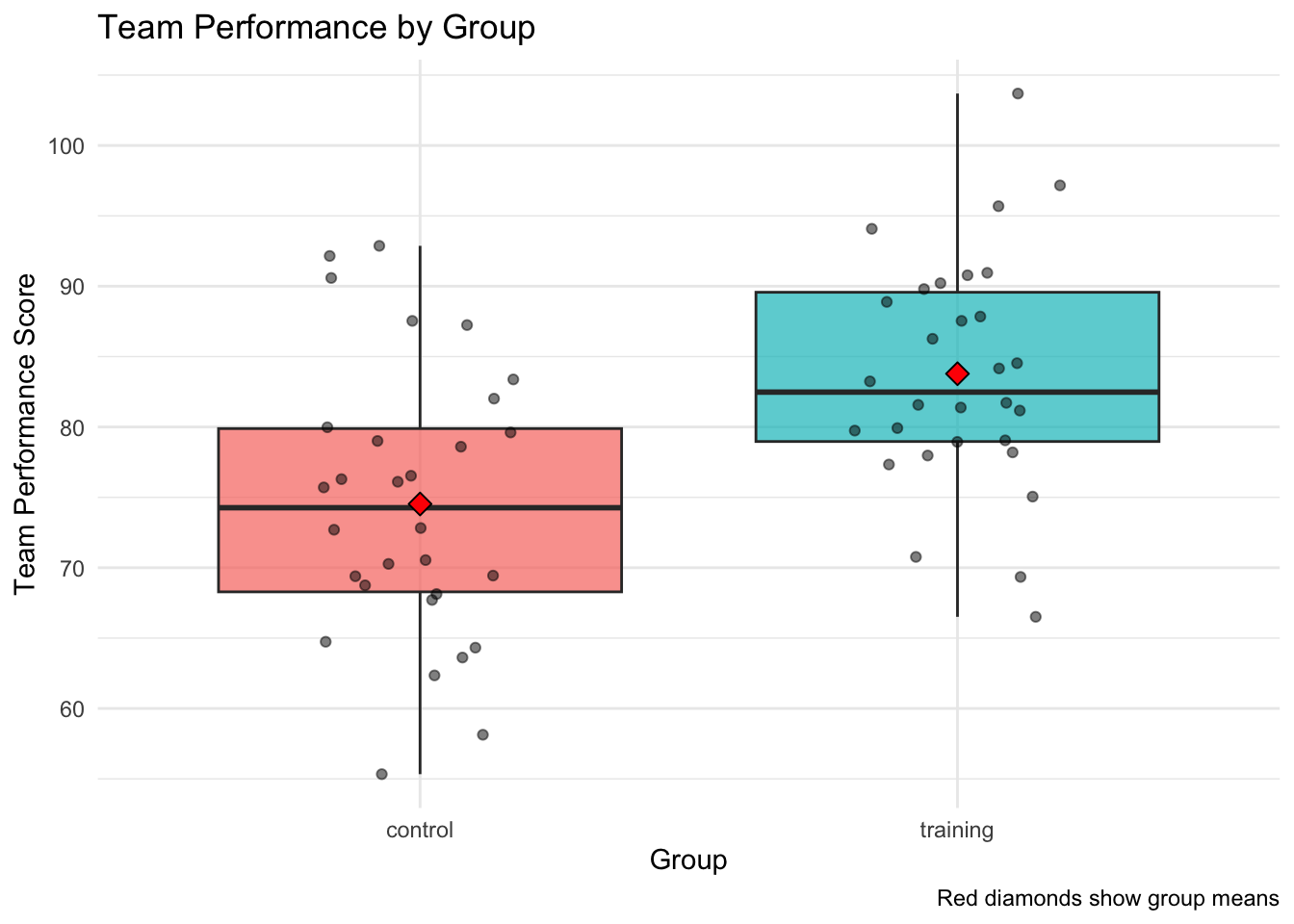
As usual, it is also strongly recommended to complement the quantitative info with a visualization.
Data such as these is often presented using boxplots:
```{r}
ggplot(leadership_study_between, aes(x = group, y = team_performance, fill = group)) +
  geom_boxplot(alpha = 0.7) +
  geom_jitter(width = 0.2, alpha = 0.5) +
  stat_summary(fun = mean, geom = "point", shape = 23, size = 3, fill = "red") +
  labs(title = "Team Performance by Group",
       x = "Group",
       y = "Team Performance Score",
       caption = "Red diamonds show group means") +
  theme_minimal() +
  theme(legend.position = "none")
```
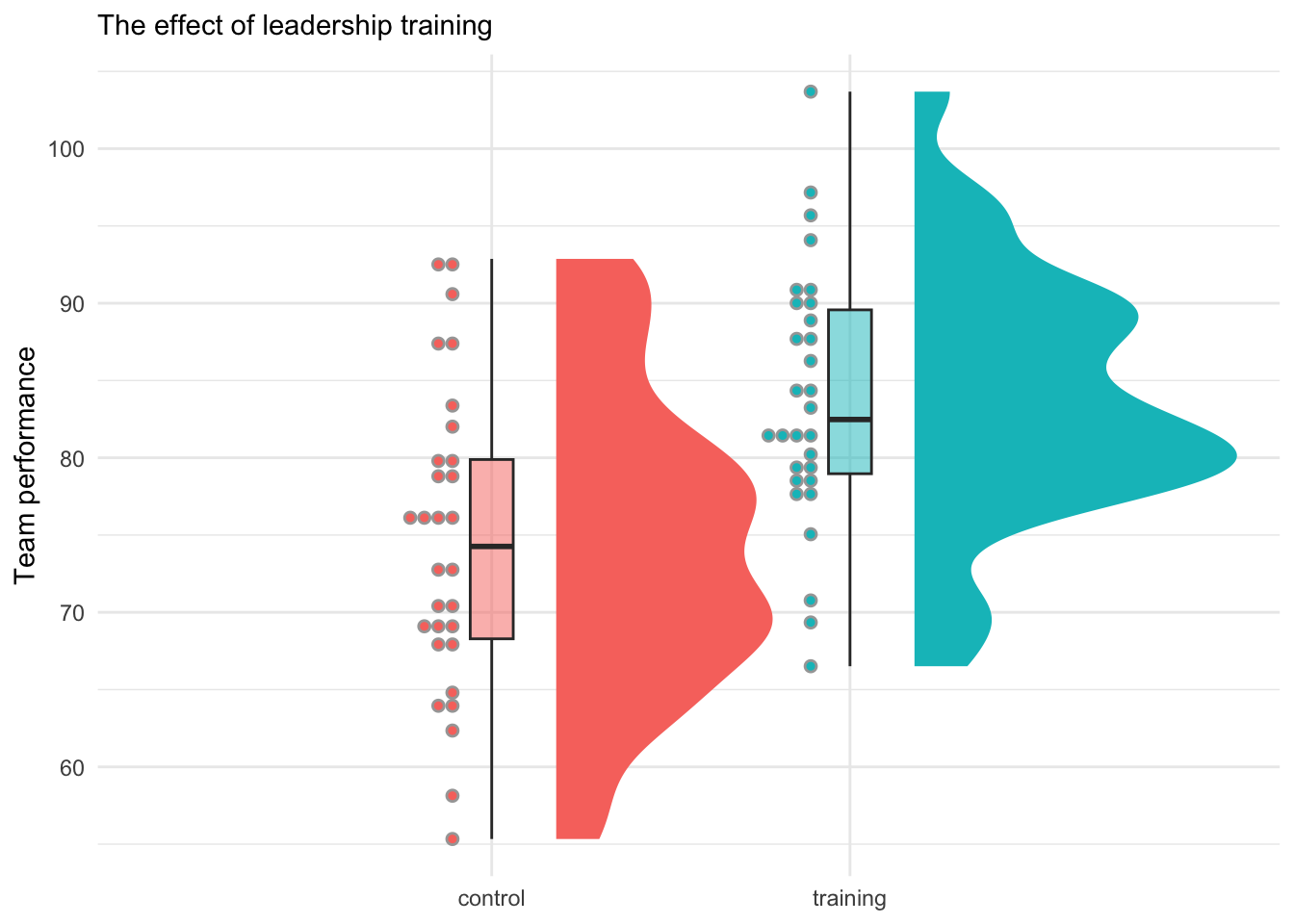
But boxplots might shallow important distributional info, so you should use them carefully or complement them with other tools. Below is an alternative that provides more information on the distribution of the data:
```{r}
ggplot(
  data = leadership_study_between,
  mapping = aes(x = group, y = team_performance, fill = group)
  ) +
    stat_halfeye(
    adjust = 0.5,
    justification = -0.2,
    .width = 0,
    point_colour = NA
  ) +
  geom_boxplot(
    width = 0.12,
    outlier.color = NA,
    alpha = 0.5
  ) +
  stat_dots(
    side = "left",
    justification = 1.1,
    binwidth = 0.85
  ) +
  labs(
    title = "The effect of leadership training",
    y = "Team performance") +
  theme_minimal() +
  theme(
    legend.position = "none",
    plot.title = element_text(size = 11),
    axis.title.x = element_blank()
  )
```
## Assumption Checking
In the following we want to compare the means across independent groups.
To this end, we may use a t-test.
But such statistical tests make specific assumptions about the data. If these assumptions were violated, the results would be unreliable or incorrect.
Therefore, it is important to check the adequacy of these assumptions for the data at hand first.
In the present case, we want to use a simple t-test. This test makes two assumptions:
1. The two groups each are normally distributed.
2. The variances of both groups are the same.
To test the first assumption, we can use the **Shapiro-Wilk Test for Normality**.
Here we test the following hypothesis:
- $H_0$ : The data is normally distributed
- $H_1$ : The data is not normally distributed
Thus, if we get $p > 0.05$, we cannot reject $H_0$. But for smaller $p$-values,
we should reject $H_0$ and need to look for alternatives to the standard t-test.
```{r}
leadership_study_between |>
  filter(group=="control") |>
  pull(team_performance) |>
  shapiro.test()
```
```{r}
leadership_study_between |>
  filter(group=="training") |>
  pull(team_performance) |>
  shapiro.test()
```
Good! We cannot reject the hypothesis of normally distributed data as the $p$-value is much larger than $0.05$.
The next step is to test, whether both groups have the same variance.
Levene's test can be used to do exactly this. It tests:
- $H_0$: The variances are equal across groups
- $H_1$: The variances are not equal across groups
If $p > 0.05$, we do not reject $H_0$ and we can use a simple t-test.
If we have to reject $H_0$, however, it would be better to use the more robust Welch test.
```{r}
car::leveneTest(team_performance ~ group, data = leadership_study_between)
```
Again, the $p$-value is much larger than $0.05$, so we can safely continue with the standard t-test.
## Independent t-test
The standard independent t-test is the common tool to compare means between two groups when we have continuous data and want to test if there's a statistically significant difference.
```{r}
t_test_result <- t.test(
  team_performance ~ group,
  data = leadership_study_between,
  var.equal = TRUE # Use FALSE if variances unequal
  )
t_test_result
```
The very small $p$-value indicates that the difference of
`r round(t_test_result$estimate[1] - t_test_result$estimate[2], 2)`
is highly significant!
## Effect Size Calculation
The previous result tells us that the difference in
means between the groups appears to be about
`r round(t_test_result$estimate[1] - t_test_result$estimate[2], 2)`. But is this a lot?
Effect sizes tell us about the practical significance of our findings by relating the absolute numbers to the scale of the measurement.
Unlike $p$-values, effect sizes are not influenced by sample size and help us understand if our statistically significant result is also practically meaningful.
The standard measure is **Cohen's d**: This standardized effect size tells us how many standard deviations apart the two group means are.
Its interpretation follows a convention:
- **Small effect**: $d\approx 0.2$ (groups overlap about 85%)
- **Medium effect**: $d\approx 0.5$ (groups overlap about 67%)
- **Large effect**: $d\approx 0.8$ (groups overlap about 53%)
The implementation in R is trivial:
```{r}
cohens_d <- effectsize::cohens_d(team_performance ~ group, data = leadership_study_between)
print(cohens_d)
```
The key value here is Cohen's d of `r round(cohens_d$Cohens_d, 2)`!
This suggests a large and practically meaningful effect!
## Paired t-test Example
Next, we might want to look at our research question from a slightly different angle.
Rather than the between-subject design from above, we now take a *within-subject* view:
to this end, we want to check whether the training had an effect on those people who were in the training (treatment) group by comparing their performance before and after the training.
To this end, we use the data set `leadership_study_within`, and then
use the function `t.test()` with the argument `paired = TRUE`.
This makes sure we are using the version of the test for the within-subjects context:
```{r}
paired_result <- t.test(
  leadership_study_within$post_performance,
  leadership_study_within$pre_performance,
  paired = TRUE)
print(paired_result)
```
As above, we should also compute standardized effect sizes.
There are two options: using the t-test object directly, or using the raw data.
If you do the latter, make sure to set `paired=TRUE` to use the correct version
for the within context:
```{r}
cohens_d_within_a <- effectsize::cohens_d(paired_result)
print(cohens_d_within_a)
```
```{r}
cohens_d_within_b <- effectsize::cohens_d(
  leadership_study_within$post_performance,
  leadership_study_within$pre_performance,
  paired = TRUE)
print(cohens_d_within_b)
```
**Exercise**: Interpret the results of the test above. What can we conclude about the effectiveness of leadership training?
::: {.callout-tip title="Possible answers" collapse="true"}
- **Statistical significance**: If $p < 0.05$, training significantly improved performance; since $p\approx 0$, the training has a highly significant effect
- **Effect size interpretation**: Cohen's d is large, so we have a large effect. This suggests the effect of the training is also practically meaningful.
- **Confidence interval**: If the CI doesn't include 0, we're confident there's a real difference
- **Business implication**: Training appears effective and worth the investment
:::
---
# Part 3: Multi-Group Experiments - ANOVA
Let us now turn to the following research question:
> Which communication method (face-to-face, video call, email) leads to highest satisfaction?
Note that this time we not only compare one group to another as in the previous section, but we need to compare three groups with each other as we have three different communication methods.
Therefore, we cannot use simple t-tests, but need to use an ANOVA.
## Descriptive statistics
But first, let us again look at the data:
```{r}
communication_study %>%
  group_by(communication_method) %>%
  summarise(
    n = n(),
    mean = mean(satisfaction_score),
    sd = sd(satisfaction_score),
    min = min(satisfaction_score),
    max = max(satisfaction_score),
    .groups = 'drop'
  ) |>
  kable(digits = 2)
```
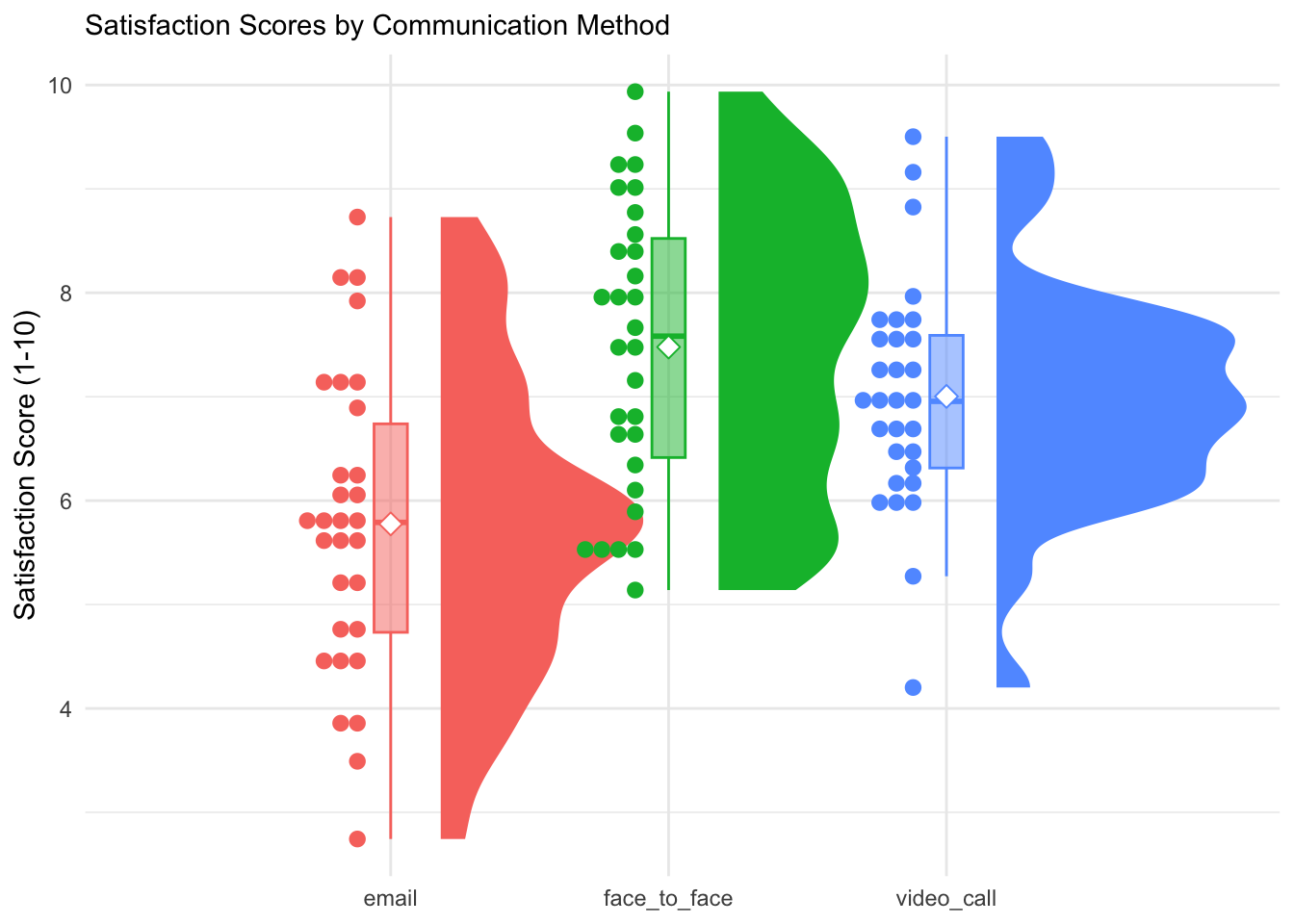
And complement this by a visualization:
```{r}
ggplot(
  data = communication_study,
  mapping = aes(
    x = communication_method,
    y = satisfaction_score,
    fill = communication_method,
    color = communication_method)
  ) +
    stat_halfeye(
    adjust = 0.5,
    justification = -0.2,
    .width = 0,
    point_colour = NA
  ) +
  geom_boxplot(
    width = 0.12,
    outlier.color = NA,
    alpha = 0.5
  ) +
  stat_dots(
    side = "left",
    justification = 1.1,
    binwidth = 0.15
  ) +
  stat_summary(fun = mean, geom = "point", shape = 23, size = 3, fill = "white") +
  labs(
    title = "Satisfaction Scores by Communication Method",
    x = "Communication Method",
    y = "Satisfaction Score (1-10)") +
  theme_minimal() +
  theme(
    legend.position = "none",
    plot.title = element_text(size = 11),
    axis.title.x = element_blank()
  )
```
## ANOVA Assumptions
ANOVA is more robust than t-tests but still requires certain conditions to be met for valid results.
In fact, we are testing the same assumptions as in the t-test case:
- **Normality of Residuals**: For ANOVA, we check if the residuals (not the raw data) are normally distributed.
- **Homogeneity of Variances**: ANOVA assumes that the variance of the dependent variable is equal across all groups.
Let us start with testing the normality of the residuals. We again use the Shapiro test, which tests the following hypothesis:
- **$H_0$**: Residuals are normally distributed
- **$H_1$**: Residuals are not normally distributed
Thus, if $p > 0.05$, the Null cannot be rejected and we can assume the residuals to follow a normal distribution.
```{r}
aov_model <- aov(satisfaction_score ~ communication_method, data = communication_study)

shapiro.test(residuals(aov_model))
```
Since $p>0.05$ we are on the safe side!
We then check the equality of variances and again use Levene's test:
```{r}
car::leveneTest(satisfaction_score ~ communication_method, data = communication_study)
```
Again, the Null cannot be rejected and we can continue with the ANOVA as planned.
## One-Way ANOVA
Since we compare three groups we do not use t-tests but an ANOVA.
As you know, ANOVA is actually a special case of linear regression.
Therefore, we can get the ANOVA results in two equivalent ways.
The first option is to use the classical `aov()` function:
```{r}
anova_result <- aov(satisfaction_score ~ communication_method, data = communication_study)
summary(anova_result)
```
The second option is to use `lm()` as we know it from linear regression:
```{r}
lm_model <- lm(satisfaction_score ~ communication_method, data = communication_study)
anova(lm_model)
```
- The overall $p$-value is extremely small, so the Null hypothesis of no difference between the groups should definitely be rejected
- In other words: Communication method significantly affects satisfaction scores
- This means that at least one communication method produces significantly different satisfaction scores than the others
- But the result does not tell us which specific methods differ from each other (need post-hoc tests, see below)
## Detour: categorical variables in Regression
When you add a categorical variable as a predictor to your regression, R automatically creates dummy variables for categorical predictors. The first level alphabetically becomes the reference group:
```{r}
summary(lm_model)$coefficients |>
  kable(digits = 3)
```
Since 'email' comes first alphabetically, it is the reference group.
- **Intercept** = mean of reference group (email, comes first alphabetically)
- **communication_methodface_to_face** = difference between face_to_face and email
- **communication_methodvideo_call** = difference between video_call and email
### Detour: When to Use `lm()` vs `aov()`
As shown above, both approaches give identical results.
Still, they offer different perspectives:
**Use aov() when:**
- You want traditional ANOVA output
- Focus is on group comparisons
- Need post-hoc tests such as `TukeyHSD()`, which take the `aov`-model as an input
**Use lm() when:**
- You want to see specific contrasts
- Planning to add continuous covariates later
- Want regression-style interpretation
- Building toward more complex models
::: {.callout-tip collapse="true"}
### Example: From ANOVA to ANCOVA
If we add a continuous variable to an ANOVA, we get an ANCOVA:
```{r}
ancova_model <- lm(satisfaction_score ~ communication_method + task_completion_time,
                   data = communication_study)
summary(ancova_model)
```
In the example, we now control for individual differences in task completion time.
:::
## Effect Size for ANOVA
$\eta^2$ tells us what proportion of the total variance in the dependent variable is explained by the independent variable:
Remember that:
- **Small effect**: η² ≈ 0.01 (1% of variance)
- **Medium effect**: η² ≈ 0.06 (6% of variance)
- **Large effect**: η² ≈ 0.14 (14% of variance)
In our case:
```{r}
eta_squared <- effectsize::eta_squared(anova_result)
print(eta_squared)
```
$\eta=$ `r round(eta_squared$Eta2, 2)` means communication method explains
`r round(eta_squared$Eta2, 2)*100`
% of the variance of satisfaction scores.
## Post-Hoc Comparisons
The ANOVA tells us there's a difference somewhere among the groups, but not which specific groups differ.
This is why we need post-hoc tests:
they provide these pairwise comparisons while controlling for multiple testing.
::: {.callout-tip collapse="true"}
### The multiple testing problem
If we do multiple t-tests (e.g. one for each pairwise comparison), our Type I error rate will inflate.
Post-hoc tests adjust critical values to maintain overall $\alpha = 0.05$.
:::
The most common post-hoc test has a nice name:
Tukey's Honestly Significant Difference (HSD).
It takes the fitted ANOVA model as its input:
```{r}
tukey_result <- TukeyHSD(anova_result)
print(tukey_result)
```
This suggests that the following differences exist:
- Face-to-face > Email: 1.70 points higher satisfaction ($p < 0.001$)
- Video call > Email: 1.23 points higher satisfaction ($p = 0.002$)
But there are no significant differences between video calls and face-to-face ($p = 0.35$)
Thus, both face-to-face and video call communication methods produce significantly higher satisfaction scores than email, but face-to-face and video call don't differ significantly from each other.
# Part 4: Factorial Designs
For this last part we consider the following research question:
> How do feedback type and experience level interact to affect performance improvement?
We use the data stored as `factorial_study`:
```{r}
factorial_study %>%
  group_by(feedback_type, experience_level) %>%
  summarise(
    n = n(),
    mean = mean(performance_improvement),
    sd = sd(performance_improvement),
    .groups = 'drop'
  ) |>
  kable(digits = 2)
```
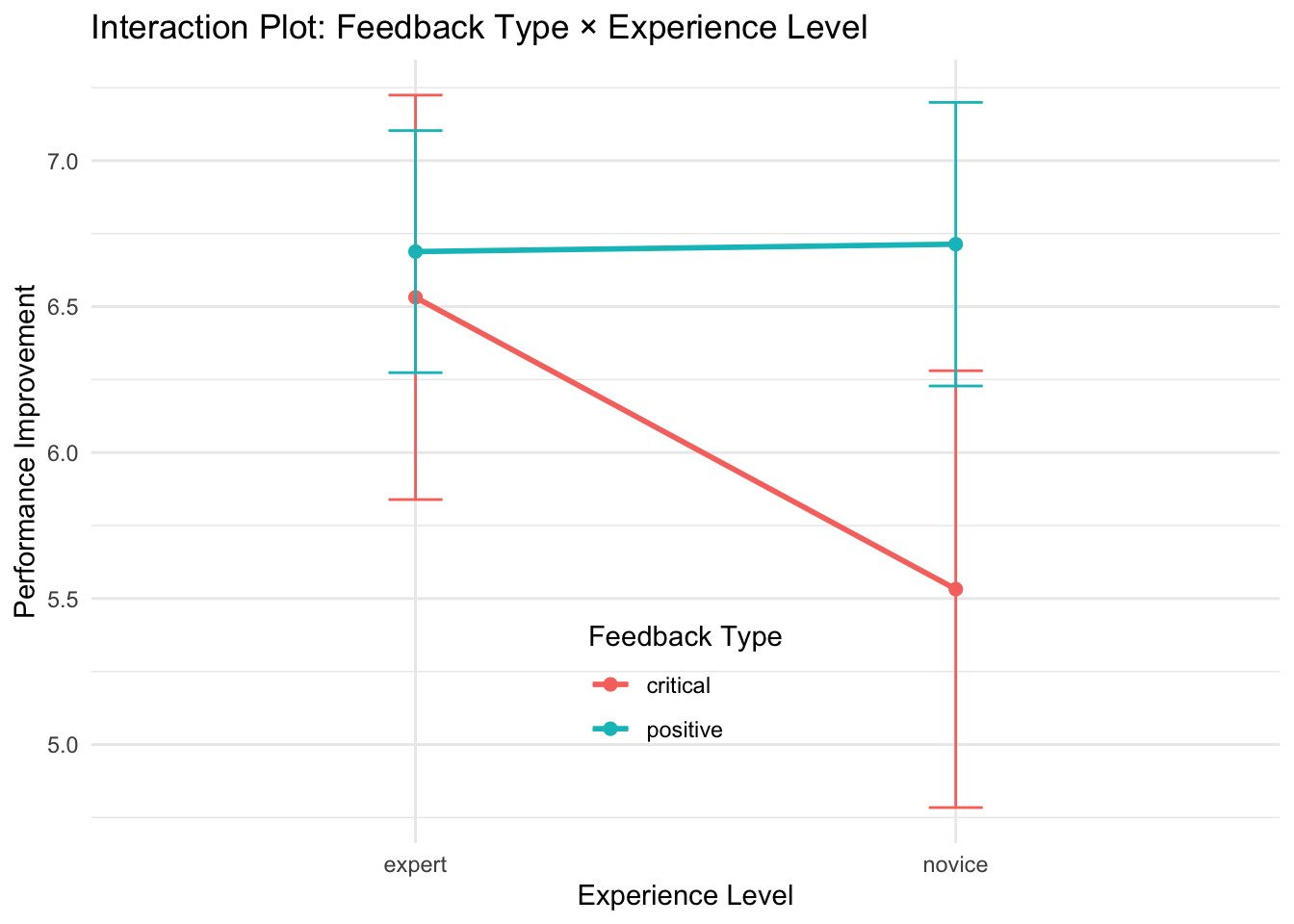
We then visualize the relationship using an interaction plot as discussed in the lecture:
```{r}
ggplot(
  data = factorial_study,
  mapping = aes(
    x = experience_level,
    y = performance_improvement,
    color = feedback_type,
    group = feedback_type)
  ) +
  stat_summary(fun = mean, geom = "point", size = 2) +
  stat_summary(fun = mean, geom = "line", linewidth = 1) +
  stat_summary(fun.data = mean_se, geom = "errorbar", width = 0.1) +
  guides(color = guide_legend(position = "inside")) +
  labs(
    title = "Interaction Plot: Feedback Type × Experience Level",
    x = "Experience Level",
    y = "Performance Improvement",
    color = "Feedback Type") +
  theme_minimal() +
  theme(legend.position.inside = c(0.5, 0.2))
```
## Two-Way ANOVA - Checking assumptions
The factorial design allows us to consider interaction effects among factors.
But to detect such interaction, we must use a two-way ANOVA!
The assumptions are in fact the same as in the previous case:
1. Normality of *residuals* (not raw data)
2. Homogeneity of variances (across *all* groups)
To fit the model with two factors:
```{r}
factorial_model <- aov(
  formula = performance_improvement ~ feedback_type * experience_level,
  data = factorial_study)
```
::: {.callout-tip title="Two-way ANOVA and linear regression"}
While the classical ANOVA was the same as simple linear regression with categorical variables,
two-way ANOVA is the same as *multiple* regression with interaction effects:
```{r}
lm_factorial <- lm(performance_improvement ~ feedback_type * experience_level,
                   data = factorial_study)
anova(lm_factorial)
```
is the same as:
```{r}
summary(factorial_model)
```
:::
Testing normality of residuals:
```{r}
shapiro.test(x = residuals(factorial_model))
```
Since we test the same assumptions as above, $p>0.05$ means that we cannot reject the
$H_0$ of normally distributed residuals.
Testing homogeneity of variances:
```{r}
car::leveneTest(
  performance_improvement ~ feedback_type * experience_level,
  data = factorial_study)
```
This time $p<0.05$, so we need to reject $H_0$ of equal variances, meaning that some cells (in the sense of factor-combinations) have more variation than others.
::: {.callout-tip title="Understanding the Variance Pattern"}
We could have a look at which cells are affected like this:
```{r}
factorial_study %>%
  group_by(feedback_type, experience_level) %>%
  summarise(
    n = n(),
    variance = var(performance_improvement),
    sd = sd(performance_improvement),
    .groups = 'drop'
  ) %>%
  kable(digits = 3)
```
This suggests that critical feedback is "riskier" - it might help some people a lot but hurt others.
This example shows how testing assumptions is not only relevant for its own sake, but also hints at interesting results themselves.
:::
Since the assumptions are violated, we use a version of the two-way ANOVA that is robust to unequal variances. We use the function `Anova()` from the `car` package with `type = "III"`:
```{r}
factorial_model_robust <- car::Anova(factorial_model, type = "III")
```
## Two-Way ANOVA: Interpretation
Let us now inspect the results of the two-way ANOVA.
We will pay particular attention to the following aspects:
1. **Main effect of feedback_type**: Overall difference between positive vs critical
2. **Main effect of experience_level**: Overall difference between novice vs expert
3. **Interaction**: Does the effect of feedback depend on experience level?
```{r}
factorial_model_robust
```
From this output we see that all three effects (both main effects and the interaction) are non-significant, suggesting that:
- Neither feedback type nor experience level significantly affects performance improvement
- The combination of these factors doesn't create any synergistic effects
- The observed differences in your sample means are likely due to random variation rather than true population differences
# Part 5: Power Analysis and Sample Size Planning
Statistical power is the probability of detecting an effect when it truly exists.
## General aspects of power analysis
Remember the **components of power analysis:**
- **Power**: Probability of detecting effect (usually we want ≥ 0.8)
- **Effect size**: How big a difference we want to detect
- **Sample size**: Number of participants needed
- **Alpha level**: Type I error rate (usually 0.05)
We can use power analysis in two different ways:
1. **Post-hoc (observed)**: What was our power given the sample size we had?
2. **A priori (prospective)**: How many participants do we need to detect an effect?
Regarding the first, we may ask:
what was our power to detect the effect we found in the leadership study?
```{r}
observed_power <- pwr.t.test(n = 30, d = as.numeric(cohens_d$Cohens_d), sig.level = 0.05)
print(observed_power)
```
For the
*a priori power analysis*, you need to specify your research parameters:
- What effect size do you want to detect?
- What power level do you want? (typically 0.8 or 0.9)
- What alpha level will you use? (typically 0.05)
## t-Tests
Assume we want to plan a new leadership training study.
We want to detect a medium effect ($d = 0.5$) with 80% power.
```{r}
sample_size_medium <- pwr.t.test(d = 0.5, power = 0.8, sig.level = 0.05)
print(sample_size_medium)
```
And what would happen if we wanted higher power (90%) for a medium effect?
```{r}
sample_size_high_power <- pwr.t.test(d = 0.5, power = 0.9, sig.level = 0.05)
print(sample_size_high_power)
```
We see that small design choices can have huge effects:
```{r}
power_results <- tibble(
  Scenario = c("Medium effect, 80% power", "Small effect, 80% power", "Medium effect, 90% power"),
  Effect_Size = c(0.5, 0.2, 0.5),
  Power = c(0.8, 0.8, 0.9),
  Sample_per_Group = c(
    ceiling(sample_size_medium$n),
    ceiling(pwr.t.test(d = 0.2, power = 0.8, sig.level = 0.05)$n),
    ceiling(sample_size_high_power$n)
  )
)

kable(power_results)
```
## ANOVA
Assume we are planning a communication study with 3 groups and we want to
detect a medium effect (f = 0.25) with 80% power.
Note that what was Cohen's d for the t-test case, has now become Cohen's f for the ANOVA case:
```{r}
sample_size_anova <- pwr.anova.test(
  k = 3, f = 0.25, sig.level = 0.05, power = 0.8)
print(sample_size_anova)
```
Aside from that it works the same way as above!
# Summary and Key Takeaways
## Key take-aways
1. **Data exploration** is crucial before statistical testing
2. **Assumption checking** ensures valid results and guides method selection
3. **Effect sizes** provide practical significance context beyond p-values
4. **Visualization** aids interpretation and communication of results
5. **ANOVA is just regression** with categorical predictors
6. **Both aov() and lm()** give identical results but offer different perspectives
7. **Post-hoc tests** control for multiple comparisons when making pairwise comparisons
8. **Factorial designs** allow detection of interactions between factors
## Key decisions to be made
- **Assumptions violated**: Choose appropriate alternatives (Welch's tests, transformations, non-parametric)
- **Multiple groups**: ANOVA preferred over multiple t-tests
- **Factorial designs**: Allow testing of interactions between factors but requires two-way ANOVA
- **Effect size interpretation**: Always consider practical alongside statistical significance
- **Post-hoc testing**: Required when ANOVA is significant to identify which groups differ
## Practice
This tutorial is accompanied by a practice exercise: analyze data from an experiment where employees were randomly assigned to three work environments (open office, private office, flexible workspace) to assess their effect on creativity scores.
The exercise asks you to:
1. Explore the data and compute descriptive statistics for each group
2. Check the assumptions (normality of residuals, equality of variances) before proceeding
3. Conduct a one-way ANOVA using both `aov()` and `lm()` and verify they give identical results
4. If significant, identify which groups differ using Tukey's HSD and calculate eta-squared as an effect size measure
5. Create a visualization of the results and write a short interpretation
6. As a bonus, add years of experience as a covariate (ANCOVA) and check if this changes your conclusions
<script src="https://giscus.app/client.js"
data-repo="graebnerc/research-methodology-hub"
data-repo-id="R_kgDOS7J-4w"
data-category="Comments"
data-category-id="DIC_kwDOS7J-484C_N51"
data-mapping="pathname"
data-strict="0"
data-reactions-enabled="1"
data-emit-metadata="0"
data-input-position="bottom"
data-theme="preferred_color_scheme"
data-lang="en"
crossorigin="anonymous"
async>
</script>