Packages used on this page
library(WDI)
library(dplyr)
library(tidyr)
library(readr)
library(readxl)
library(ggplot2)
library(kableExtra)Claudius Gräbner-Radkowitsch
September 16, 2026
September 16, 2026
Most empirical work on cross-country development starts with the same task: getting the numbers onto your machine in a usable shape. This page covers that task. It is deliberately practical — the conceptual question of which indicator you should want is treated in The Theory-Ladenness of Observation, and the individual indicator families are covered in the other pages of the Measuring Development track.
Four skills are worth having before you need them:
WDI PackageThe World Development Indicators (WDI) database is the single most useful starting point for cross-country work. It holds roughly 1,500 indicators for over 200 economies, in many cases back to 1960. The WDI package queries its API directly, which means your script documents exactly which data it used — a substantial improvement over a folder of undated spreadsheets.
Every series has a code such as NY.GDP.PCAP.PP.CD. The codes are structured (NY = national accounts, SP = population, SE = education, SH = health, SI = income distribution, EN = environment), but you do not need to memorise them. WDIsearch() does a regular-expression search over indicator names:
WDIsearch("literacy rate, adult").
| indicator | name |
|---|---|
| SE.ADT.LITR.FE.ZS | Literacy rate, adult female (% of females ages 15 and above) |
| SE.ADT.LITR.MA.ZS | Literacy rate, adult male (% of males ages 15 and above) |
| SE.ADT.LITR.ZS | Literacy rate, adult total (% of people ages 15 and above) |
You can also browse the World Bank data portal and read the code off the URL of the indicator’s page, which is often quicker and gives you the methodological documentation at the same time.
The World Bank periodically discontinues series. EN.ATM.CO2E.PC (CO₂ emissions per capita) is a good example: it still appears in WDIsearch() results, but the API no longer serves it, and it has been superseded by EN.GHG.CO2.PC.CE.AR5. A request for a retired code does not raise an error — it returns a data frame with the column silently missing. Always check that the columns you asked for actually came back before proceeding:
WDI() takes a named vector of indicator codes, which lets you rename the columns to something readable in the same step:
Two arguments are worth knowing:
country = "all" returns every economy plus every aggregate. This is the usual choice for cross-country analysis, and it is what makes the next section necessary.extra = TRUE adds columns for region, income group, capital, longitude and latitude. The region column is the cleanest way to drop aggregates, and the income column is useful for grouping countries in plots.If you put a raw WDI() call in a Quarto document, the World Bank API is contacted every single time the document renders. This is slow, it fails entirely when you are offline, and — most importantly — it makes your output irreproducible: the numbers can change between renders when the World Bank revises its data, and you will not notice.
The fix is a small caching wrapper. Download if there is no cached copy; otherwise read the cached copy.
#' Download WDI data once, then re-use the cached copy
#'
#' @param indicators Named character vector of World Bank indicator codes
#' @param file Name of the cache file inside `data/`
#' @param ... Further arguments passed to `WDI::WDI()`
#' @return A tibble with the requested data
wdi_cached <- function(indicators, file, ...) {
path <- file.path("data", file)
if (!file.exists(path)) {
message("Cache miss - downloading from the World Bank API ...")
write_csv(WDI(indicator = indicators, ...), path)
}
out <- read_csv(path, show_col_types = FALSE)
# Guard against a retired indicator code (which returns silently without its
# column) and against a cache file written by a different query
stopifnot(all(names(indicators) %in% names(out)))
out
}Used like this, the download happens exactly once — the first time the document is rendered on a machine where the cache file is absent:
[1] 1325 15
Because the cache file is a plain CSV, you should commit it to your repository alongside your code. Anyone who clones the project then gets exactly the data your results were built on, and can reproduce your figures without network access. To deliberately refresh the data, delete the file and re-run.
This pattern generalises well beyond WDI(). Any expensive or network-dependent step — an API query, a long simulation, a large model fit — benefits from the same if (!file.exists(path)) guard.
For anything beyond a teaching example, add a provenance record to the cache: write a small companion file holding the download date, the package version, and the indicator codes requested.
World Bank series are revised: PPP conversion factors are rebased, national accounts are restated, and poverty lines are periodically redefined. Without a download date, a reviewer cannot tell which vintage of the data your results refer to, and neither can you a year later. Quarto’s freeze mechanism caches executed output, which is a different and complementary guarantee: freeze stops the code from re-running, while the cache file pins the data the code ran on.
With country = "all", the World Bank returns roughly 265 rows per year, but there are not 265 countries. The extract also contains regional aggregates (“Sub-Saharan Africa”), income-group aggregates (“Low income”), and organisational groupings (“OECD members”, “Euro area”). Leaving them in silently double-counts large parts of the world and will distort any cross-country regression or scatter plot.
With extra = TRUE, aggregates are identifiable because their region field is missing or set to "Aggregates":
all_rows country_rows n_countries
1325 1070 214
A typical preparation pipeline averages over a few years to fill survey gaps, drops rows with missing values, and derives the variable of interest:
literacy_gap <- literacy_countries |>
summarise(
across(c(LiteracyFemale, LiteracyMale, GDPpc), \(x) mean(x, na.rm = TRUE)),
region = first(region),
.by = country
) |>
filter(if_all(c(LiteracyFemale, LiteracyMale, GDPpc), \(x) !is.nan(x))) |>
mutate(gap = LiteracyMale - LiteracyFemale)
nrow(literacy_gap)[1] 105
ggplot(literacy_gap, aes(x = GDPpc, y = gap)) +
geom_hline(yintercept = 0, linetype = "dashed", colour = "grey50") +
geom_point(aes(colour = region), alpha = 0.8, size = 2) +
scale_x_log10(labels = scales::dollar_format()) +
scale_colour_viridis_d(option = "H") +
labs(
x = "GDP per capita (PPP, log scale)",
y = "Literacy gap (male % - female %)",
colour = NULL
) +
theme_minimal() +
theme(legend.position = "bottom") +
guides(colour = guide_legend(nrow = 3))
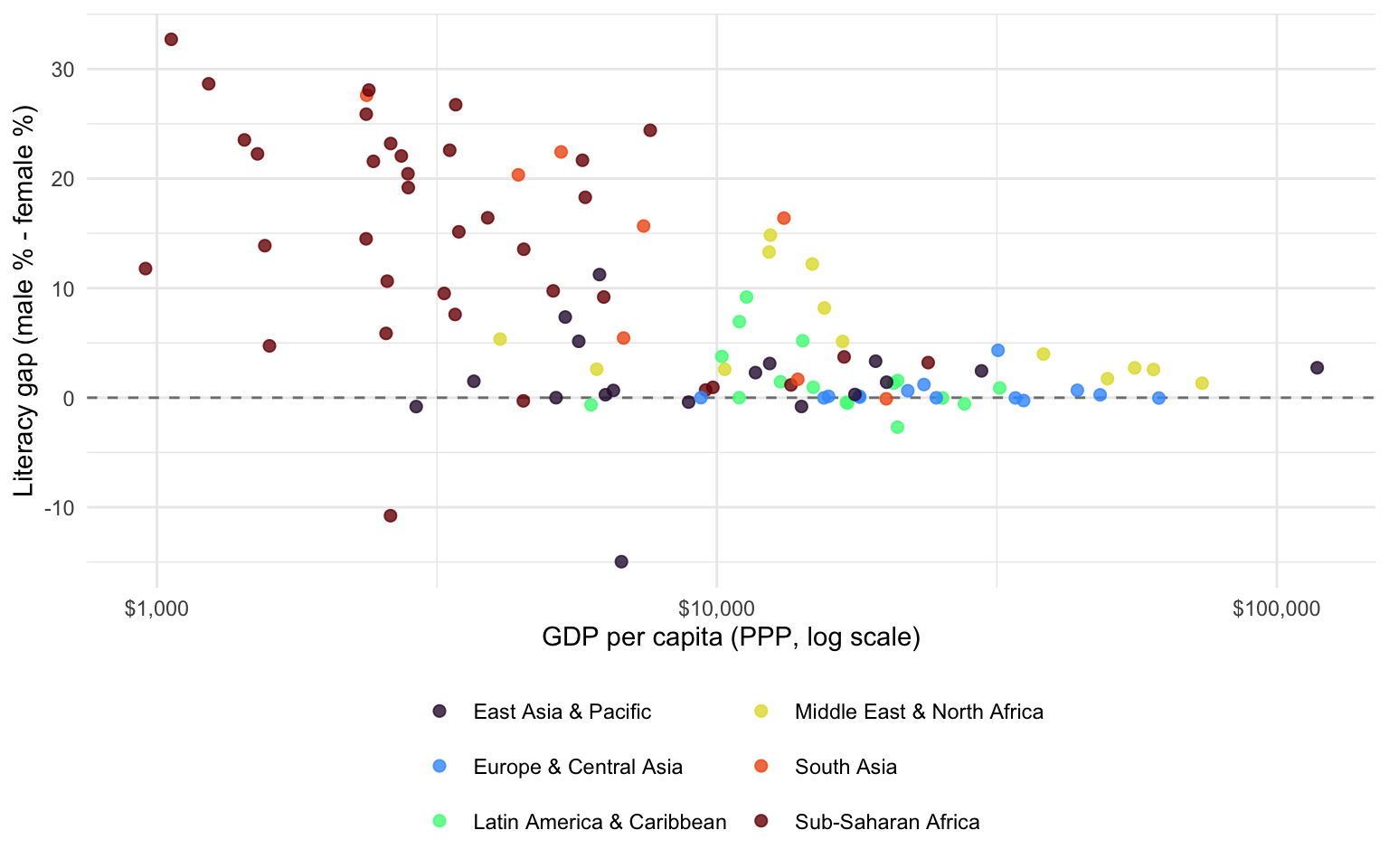
Note how few countries survive the filter — literacy rates are estimated from censuses and surveys that many high-income countries no longer run, because near-universal literacy is assumed. Missing data in cross-country work is rarely missing at random, and the set of countries you end up analysing is itself a result worth reporting.
The World Bank does not have everything, and for several important indicators it is not the best source. Four others cover most of what you will need.
The place to get the HDI and its relatives (GDI, GII, MPI, and the inequality-adjusted IHDI). Data come as an Excel statistical annex from the Human Development Reports data centre.
The annex is formatted for human readers, not for machines: it carries a multi-row header, interleaved section rows such as “Very high human development”, and a trailing block of notes. Use the range argument of read_excel() to take only the rectangle you want:
The select(-starts_with("...")) drops the unnamed spacer columns that Excel exports produce. Always print the result and compare it against the spreadsheet before going further.
The reference source for top income and wealth shares, built from tax records rather than household surveys. It reaches much further up the distribution than survey-based measures, which is exactly where survey data are weakest. Export your selection from the WID data portal as Excel and read it in. There is also an wid R package maintained by the project.
OWID republishes data from many sources — the World Bank, UN agencies, academic projects — in a consistently tidy long format, with thorough documentation of what was done to the original. Every chart on ourworldindata.org has a “Download” tab giving a clean CSV plus a README describing provenance. When the primary source is awkwardly formatted, the OWID version often saves an hour.
The Harvard Growth Lab’s Atlas publishes the Economic Complexity Index, product-level trade data, and growth projections. The Observatory of Economic Complexity offers a similar database with a different aggregation methodology — worth knowing, since ECI values are not identical across the two.
Combining sources means matching country identifiers, and country names are a notoriously bad key: “Korea, Rep.”, “South Korea”, “Republic of Korea”, and “Korea (Republic of)” all denote the same country. Join on ISO-3 codes, never on names. The countrycode package converts between essentially every country-coding scheme in use:
[1] "KOR" "VNM" "CIV" "TUR"
countrycode() warns about values it cannot match, and those warnings should be read rather than suppressed — they are usually either aggregates that should be dropped or genuine countries that need a manual fix.
WDIsearch() or on the World Bank portal, and verify that requested columns actually returned — retired codes fail silently.wdi_cached()-style helper and commit the cache file, so that your results are reproducible and your renders work offline.extra = TRUE and filter on region to drop aggregates.The next pages in the track put this toolkit to work on specific families of indicators: income, output and complexity, inequality and poverty, and human development and social indicators.
@inreference{graebner2026-accessing-development-data-in-r,
author = {Gräbner-Radkowitsch, Claudius},
editor = {Gräbner-Radkowitsch, Claudius},
title = {Accessing {Development} {Data} in {R}},
booktitle = {Method and Inquiry},
date = {2026-09-16},
url = {https://euf-methodology-hub.netlify.app/resources/accessing-development-data-in-r},
langid = {en}
}
---
title: "Accessing Development Data in R"
description: "A practical guide to gathering cross-country development data: querying the World Bank API with the WDI package, caching downloads so they run only once, and obtaining data from the UNDP, WID.world, Our World in Data, and the Atlas of Economic Complexity."
author: "Claudius Gräbner-Radkowitsch"
date: 2026-09-16
date-modified: 2026-09-16
image: ../assets/images/placeholder.png
learning-objectives:
- "Find the code for an indicator with `WDIsearch()` and download it with `WDI()`"
- "Write a caching wrapper so that a dataset is downloaded once and re-used on every subsequent run"
- "Separate genuine countries from regional and income aggregates in World Bank data"
- "Locate and import data from the UNDP, WID.world, Our World in Data, and the Atlas of Economic Complexity"
categories:
- R
- data-cleaning
- measurement
- indicators
- reproducibility
- tutorial
- BA
- MA
level:
- BA
- MA
content-type: tutorial
citation:
id: graebner2026-accessing-development-data-in-r
type: entry-encyclopedia
container-title: "Method and Inquiry"
title: "Accessing Development Data in R"
editor:
- name: "Claudius Gräbner-Radkowitsch"
url: https://euf-methodology-hub.netlify.app/resources/accessing-development-data-in-r
---
# Introduction
Most empirical work on cross-country development starts with the same task:
getting the numbers onto your machine in a usable shape. This page covers that
task. It is deliberately practical — the conceptual question of *which*
indicator you should want is treated in
[The Theory-Ladenness of Observation](theory-ladenness-of-observation.qmd), and
the individual indicator families are covered in the other pages of the
[Measuring Development](../tracks/measuring-development.qmd) track.
Four skills are worth having before you need them:
1. Querying the World Bank API from R, so you never download a spreadsheet by
hand again.
2. Caching those downloads, so your analysis does not hit the network every time
it runs.
3. Knowing which rows in a World Bank extract are actually countries.
4. Knowing where to go when the World Bank does not have what you need.
```{r}
#| label: setup
#| code-summary: "Packages used on this page"
library(WDI)
library(dplyr)
library(tidyr)
library(readr)
library(readxl)
library(ggplot2)
library(kableExtra)
```
# The World Bank: the `WDI` Package
The World Development Indicators (WDI) database is the single most useful
starting point for cross-country work. It holds roughly 1,500 indicators for
over 200 economies, in many cases back to 1960. The `WDI` package queries its
API directly, which means your script documents exactly which data it used —
a substantial improvement over a folder of undated spreadsheets.
## Finding an indicator code
Every series has a code such as `NY.GDP.PCAP.PP.CD`. The codes are structured
(`NY` = national accounts, `SP` = population, `SE` = education, `SH` = health,
`SI` = income distribution, `EN` = environment), but you do not need to memorise
them. `WDIsearch()` does a regular-expression search over indicator names:
```{r}
#| label: search
#| eval: false
WDIsearch("literacy rate, adult")
```
```{r}
#| label: tbl-search
#| echo: false
#| tbl-cap: "An extract from the results of `WDIsearch(\"literacy rate, adult\")`."
tibble::tribble(
~indicator, ~name,
"SE.ADT.LITR.FE.ZS", "Literacy rate, adult female (% of females ages 15 and above)",
"SE.ADT.LITR.MA.ZS", "Literacy rate, adult male (% of males ages 15 and above)",
"SE.ADT.LITR.ZS", "Literacy rate, adult total (% of people ages 15 and above)"
) |>
kable() |>
kable_styling(full_width = FALSE)
```
You can also browse the [World Bank data portal](https://data.worldbank.org/indicator)
and read the code off the URL of the indicator's page, which is often quicker
and gives you the methodological documentation at the same time.
::: {.callout-warning}
## Indicator codes are retired without warning
The World Bank periodically discontinues series. `EN.ATM.CO2E.PC` (CO₂
emissions per capita) is a good example: it still appears in `WDIsearch()`
results, but the API no longer serves it, and it has been superseded by
`EN.GHG.CO2.PC.CE.AR5`. A request for a retired code does not raise an error —
it returns a data frame with the column silently missing. **Always check that
the columns you asked for actually came back** before proceeding:
```r
stopifnot(all(names(indicators) %in% names(raw_data)))
```
:::
## Downloading
`WDI()` takes a named vector of indicator codes, which lets you rename the
columns to something readable in the same step:
```{r}
#| label: download-demo
#| eval: false
indicators <- c(
GDPpc = "NY.GDP.PCAP.PP.CD", # GDP per capita, PPP, current int. $
LifeExp = "SP.DYN.LE00.IN" # Life expectancy at birth
)
raw <- WDI(
country = c("DE", "BR", "VN"), # ISO-2 codes, or "all"
indicator = indicators,
start = 2000,
end = 2023
)
```
Two arguments are worth knowing:
- `country = "all"` returns every economy plus every aggregate. This is the
usual choice for cross-country analysis, and it is what makes the next section
necessary.
- `extra = TRUE` adds columns for `region`, `income` group, `capital`,
`longitude` and `latitude`. The `region` column is the cleanest way to drop
aggregates, and the `income` column is useful for grouping countries in plots.
# Caching: Downloading Once, Not Every Render
If you put a raw `WDI()` call in a Quarto document, the World Bank API is
contacted every single time the document renders. This is slow, it fails
entirely when you are offline, and — most importantly — it makes your output
**irreproducible**: the numbers can change between renders when the World Bank
revises its data, and you will not notice.
The fix is a small caching wrapper. Download if there is no cached copy;
otherwise read the cached copy.
```{r}
#| label: cache-fn
#' Download WDI data once, then re-use the cached copy
#'
#' @param indicators Named character vector of World Bank indicator codes
#' @param file Name of the cache file inside `data/`
#' @param ... Further arguments passed to `WDI::WDI()`
#' @return A tibble with the requested data
wdi_cached <- function(indicators, file, ...) {
path <- file.path("data", file)
if (!file.exists(path)) {
message("Cache miss - downloading from the World Bank API ...")
write_csv(WDI(indicator = indicators, ...), path)
}
out <- read_csv(path, show_col_types = FALSE)
# Guard against a retired indicator code (which returns silently without its
# column) and against a cache file written by a different query
stopifnot(all(names(indicators) %in% names(out)))
out
}
```
Used like this, the download happens exactly once — the first time the document
is rendered on a machine where the cache file is absent:
```{r}
#| label: cached-download
literacy <- wdi_cached(
indicators = c(
LiteracyFemale = "SE.ADT.LITR.FE.ZS",
LiteracyMale = "SE.ADT.LITR.MA.ZS",
GDPpc = "NY.GDP.PCAP.PP.CD"
),
file = "wdi-literacy-gender.csv",
country = "all",
start = 2018,
end = 2022,
extra = TRUE
)
dim(literacy)
```
::: {.callout-tip}
## Commit the cache file
Because the cache file is a plain CSV, you should commit it to your repository
alongside your code. Anyone who clones the project then gets exactly the data
your results were built on, and can reproduce your figures without network
access. To deliberately refresh the data, delete the file and re-run.
This pattern generalises well beyond `WDI()`. Any expensive or
network-dependent step — an API query, a long simulation, a large model fit —
benefits from the same `if (!file.exists(path))` guard.
:::
::: {.callout-note .level-advanced}
## 🎓 MA / PhD
For anything beyond a teaching example, add a *provenance record* to the cache:
write a small companion file holding the download date, the package version, and
the indicator codes requested.
```r
writeLines(
c(paste("downloaded:", Sys.time()),
paste("WDI version:", as.character(packageVersion("WDI"))),
paste("indicators:", paste(indicators, collapse = ", "))),
sub("\\.csv$", "-provenance.txt", path)
)
```
World Bank series are revised: PPP conversion factors are rebased, national
accounts are restated, and poverty lines are periodically redefined. Without a
download date, a reviewer cannot tell which vintage of the data your results
refer to, and neither can you a year later. Quarto's `freeze` mechanism caches
*executed output*, which is a different and complementary guarantee: freeze
stops the code from re-running, while the cache file pins the data the code
ran on.
:::
# Countries Are Not the Only Rows
With `country = "all"`, the World Bank returns roughly 265 rows per year, but
there are not 265 countries. The extract also contains regional aggregates
("Sub-Saharan Africa"), income-group aggregates ("Low income"), and
organisational groupings ("OECD members", "Euro area"). Leaving them in silently
double-counts large parts of the world and will distort any cross-country
regression or scatter plot.
With `extra = TRUE`, aggregates are identifiable because their `region` field is
missing or set to `"Aggregates"`:
```{r}
#| label: drop-aggregates
literacy_countries <- literacy |>
filter(!is.na(region), region != "Aggregates")
c(all_rows = nrow(literacy),
country_rows = nrow(literacy_countries),
n_countries = n_distinct(literacy_countries$country))
```
## Putting it together
A typical preparation pipeline averages over a few years to fill survey gaps,
drops rows with missing values, and derives the variable of interest:
```{r}
#| label: prepare-literacy
literacy_gap <- literacy_countries |>
summarise(
across(c(LiteracyFemale, LiteracyMale, GDPpc), \(x) mean(x, na.rm = TRUE)),
region = first(region),
.by = country
) |>
filter(if_all(c(LiteracyFemale, LiteracyMale, GDPpc), \(x) !is.nan(x))) |>
mutate(gap = LiteracyMale - LiteracyFemale)
nrow(literacy_gap)
```
```{r}
#| label: fig-literacy
#| fig-cap: "Gender literacy gap against income, for countries with data on all three variables. Positive values indicate higher male literacy. Averages over 2018–2022."
#| fig-height: 5
#| fig-width: 8
ggplot(literacy_gap, aes(x = GDPpc, y = gap)) +
geom_hline(yintercept = 0, linetype = "dashed", colour = "grey50") +
geom_point(aes(colour = region), alpha = 0.8, size = 2) +
scale_x_log10(labels = scales::dollar_format()) +
scale_colour_viridis_d(option = "H") +
labs(
x = "GDP per capita (PPP, log scale)",
y = "Literacy gap (male % - female %)",
colour = NULL
) +
theme_minimal() +
theme(legend.position = "bottom") +
guides(colour = guide_legend(nrow = 3))
```
Note how few countries survive the filter — literacy rates are estimated from
censuses and surveys that many high-income countries no longer run, because
near-universal literacy is assumed. **Missing data in cross-country work is
rarely missing at random**, and the set of countries you end up analysing is
itself a result worth reporting.
# Beyond the World Bank
The World Bank does not have everything, and for several important indicators it
is not the best source. Four others cover most of what you will need.
## UNDP Human Development Reports
The place to get the HDI and its relatives (GDI, GII, MPI, and the
inequality-adjusted IHDI). Data come as an Excel statistical annex from the
[Human Development Reports data centre](https://hdr.undp.org/data-center/).
The annex is formatted for human readers, not for machines: it carries a
multi-row header, interleaved section rows such as "Very high human
development", and a trailing block of notes. Use the `range` argument of
`read_excel()` to take only the rectangle you want:
```{r}
#| label: hdi-read
#| eval: false
hdi <- read_excel("data/hdi-table-2025.xlsx", range = "A6:O199") |>
select(-starts_with("..."))
```
The `select(-starts_with("..."))` drops the unnamed spacer columns that Excel
exports produce. Always print the result and compare it against the spreadsheet
before going further.
## WID.world — the World Inequality Database
The reference source for top income and wealth shares, built from tax records
rather than household surveys. It reaches much further up the distribution than
survey-based measures, which is exactly where survey data are weakest. Export
your selection from the [WID data portal](https://wid.world/data/) as Excel and
read it in. There is also an `wid` R package maintained by the project.
## Our World in Data
OWID republishes data from many sources — the World Bank, UN agencies, academic
projects — in a consistently tidy long format, with thorough documentation of
what was done to the original. Every chart on [ourworldindata.org](https://ourworldindata.org/)
has a "Download" tab giving a clean CSV plus a README describing provenance.
When the primary source is awkwardly formatted, the OWID version often saves an
hour.
## Atlas of Economic Complexity
The Harvard Growth Lab's [Atlas](https://atlas.hks.harvard.edu/data-downloads)
publishes the Economic Complexity Index, product-level trade data, and growth
projections. The [Observatory of Economic Complexity](https://oec.world/) offers
a similar database with a different aggregation methodology — worth knowing,
since ECI values are not identical across the two.
## A note on joining sources
Combining sources means matching country identifiers, and country names are a
notoriously bad key: "Korea, Rep.", "South Korea", "Republic of Korea", and
"Korea (Republic of)" all denote the same country. **Join on ISO-3 codes, never
on names.** The `countrycode` package converts between essentially every
country-coding scheme in use:
```{r}
#| label: countrycode-demo
countrycode::countrycode(
c("Korea, Rep.", "Viet Nam", "Cote d'Ivoire", "Turkiye"),
origin = "country.name",
destination = "iso3c"
)
```
`countrycode()` warns about values it cannot match, and those warnings should be
read rather than suppressed — they are usually either aggregates that should be
dropped or genuine countries that need a manual fix.
# Summary
- Look up codes with `WDIsearch()` or on the World Bank portal, and **verify that
requested columns actually returned** — retired codes fail silently.
- Wrap downloads in a `wdi_cached()`-style helper and commit the cache file, so
that your results are reproducible and your renders work offline.
- Use `extra = TRUE` and filter on `region` to drop aggregates.
- Expect missing data, and report which countries dropped out.
- For anything the World Bank lacks, go to the UNDP (human development), WID
(top shares), OWID (tidied and documented), or the Atlas (complexity).
- Join on ISO-3 codes, never on country names.
The next pages in the track put this toolkit to work on specific families of
indicators: [income, output and complexity](income-output-and-complexity-indicators.qmd),
[inequality and poverty](measuring-inequality-and-poverty.qmd), and
[human development and social indicators](human-development-and-social-indicators.qmd).